
In this guide
- What actually happens when you press a keypad button
- The seven button behaviours
- The second press: the decision most homes get wrong
- Hold-to-dim, long press and double press
- Curtain and AC buttons need their own logic
- A worked eight-button living room keypad
- Mistakes that make a keypad confusing
- How Pert delivers it (designed, not DIY)
- FAQs
This article is part of our wider coverage of home automation in Hyderabad. It is about what buttons do. Where keypads go and how they are labelled is covered in how to plan keypad layouts and engraving, and how the backlight shows what is on is covered in how smart home status feedback works.
What actually happens when you press a keypad button
In a Pert home, keypads, lighting controllers, curtain motors and sensors talk to each other over Zigbee through the Pert gateway. A press travels like this:
- The button reports an event. Not "turn on the cove", but something closer to "button 3 was pressed" (or held, or released).
- The system looks up what that event means. The programming says, for example, "button 3, short press: recall the Evening scene".
- Commands go out to the devices. The lighting controllers set their levels and the curtain motors move to their positions.
- The keypad is told the result. The button backlight updates so you can see the scene is active.
Two consequences follow. First, a button's job is software, so it can be changed later without opening the wall. Second, the button does not "know" whether the light is on unless the system tells it, which is why the press-again behaviour has to be designed rather than assumed. The full round trip normally takes a fraction of a second; home automation response time explains what affects it.
Functional buttons and scene buttons
It helps to sort every button into one of two families before deciding anything else. A functional button controls one thing directly: a light circuit, a group, a curtain or a fan. A scene button sets several things at once to stored states. Pert's compact keypads are described this way on the keypad page, with functional switches and scene switches side by side in the same plate. The two families need different press-again rules, which is where most confusion starts.
The seven button behaviours
Almost every keypad button in a home ends up as one of these. Which behaviours a particular keypad model supports, and how they are set, is confirmed during design; the table describes what each one is for.
| Behaviour | First press | Second press | Best used for |
|---|---|---|---|
| Toggle | Turns the load or group on (to its last or preset level) | Turns it off | Single circuits and groups: wardrobe light, bathroom, a room's main group |
| On-only / off-only | Always turns on (or always off) | Same again; nothing changes | Paired buttons such as "All On" and "Master" where certainty matters more than saving a button |
| One-shot scene | Sets several devices to stored levels and positions | Re-applies the same scene (resets anything that was changed) | Room scenes: Evening, Dinner, Relax, Movie |
| Scene toggle | Recalls the scene | Turns the scene's lights off, or returns to the previous state | Small rooms where the scene is the only lighting, such as a pooja room or reading corner |
| Cycle | Steps to the next level or scene in a list | Steps again (for example 100% → 60% → 30% → off) | Rarely; useful for a single dimmable light where buttons are scarce |
| Hold-to-dim | Short press toggles | Press and hold raises or lowers brightness | A single dimmable group, such as living room cove or bedroom ambient |
| Open / stop / close | Starts the curtain moving | Stops it; the next press moves the other way (on single-button setups) | Motorised curtains and blinds |
A useful test for any button: could a guest, a parent or the cook press it and predict what will happen? If the answer depends on what was pressed earlier, the behaviour is probably too clever.
The second press: the decision most homes get wrong
For a toggle, the second press is obvious: off. For a scene, it is not. Picture the Evening scene in a living room: ceiling downlights at 40%, cove at 70%, sheer curtains closed. Someone presses Evening again. Should the room switch off? Re-apply the scene? Go back to whatever it was before?
| Second-press option | What people experience | When to use it |
|---|---|---|
| Re-apply the scene | Pressing again is always safe; if someone changed a light, the scene is restored | The default for most room scenes. Pair it with a separate Off or Master button |
| Turn the scene's lights off | The button works like a big toggle; quick, but a second press by a different person can plunge the room into darkness | Small, single-purpose spaces only: pooja room, reading nook, balcony |
| Return to the previous state | Feels clever on day one; confusing by week two, because "previous" depends on what happened before | Almost never on a wall keypad; better in the app |
What "on" means for a toggle
A toggle that turns on also needs a target level. Three common choices: last level (comes back however it was left), fixed preset (always 80%, for example), or time-aware preset (80% in the day, 30% after 11 pm, so a midnight trip to the kitchen does not dazzle anyone). The time-aware version is one of the small details that makes a designed home feel considerate, and it is set in programming rather than by the person pressing the button. Time windows and night levels are covered in how to schedule home automation.
Scenes and manual changes
Once a scene is on, someone will nudge one light up with the app or a hold-to-dim button. The scene button's backlight should then show that the scene is no longer exactly active, and pressing it again should restore it. How the system decides who wins when a button, a schedule and a sensor all touch the same light is explained in how home automation resolves conflicts.
Hold-to-dim, long press and double press
Most keypads can tell a short press from a press-and-hold, and some can also detect a double press. These extra "gestures" let one button do more, but they are invisible: nothing on the engraving tells you they exist.
Hold-to-dim: the one gesture worth having
Hold-to-dim is intuitive because it changes the same thing the button already controls. A short press toggles the cove; holding it ramps the brightness. Good practice:
- Put it on a single dimmable group, not on a scene button. Dimming a scene that mixes lights, curtains and AC has no clear meaning.
- Alternate direction on each hold (up, then down), or use separate up and down buttons where the keypad has space and the room has one main dimmable layer.
- Set sensible limits, such as a 10% floor, so holding too long never leaves the room in what looks like a failure.
- Make sure the load dims cleanly across the range. A light that flickers at low levels will make the gesture feel broken. How to plan dimmer channels and lighting loads covers this.
Long press for a second, related job
A long press can also trigger a related but stronger action: a short press on Good Night sets the bedroom, a long press runs Good Night for the whole house. That works when the relationship is obvious and the owner uses it. It fails when the long-press job is something nobody else in the house knows about.
Double press: use with care
A double press has to wait a moment to see whether a second press is coming, which can make the single press feel slightly slower. It is also the gesture people trigger by accident. If you use it at all, give it to the household's power user for a convenience shortcut, never for anything that unlocks a door, opens curtains at night or switches off a room someone else might be in.
The rule of thumb: anything that someone other than the owner needs must have its own labelled button. Hidden gestures may only add convenience to what the button already says.
Curtain and AC buttons need their own logic
Curtains: open, stop, close
A curtain takes several seconds to travel, so its button needs a stop. There are three common layouts:
- Three buttons (Open, Stop, Close): clearest, but uses most of a plate.
- Two buttons (Open, Close): pressing either while the curtain is moving stops it. A good balance for most rooms.
- One button: press to move, press to stop, press again to go the other way. Compact, but people lose track of the direction. Best kept for a secondary keypad, such as the bedside.
Where a window has both a sheer and a blackout layer, each layer usually gets its own button, which is why a keypad can carry two Curtains buttons. Scene buttons can also send curtains to set positions, such as sheer 100% closed and blackout 0% for Evening. How motorised curtain automation works explains positions and limits in detail.
AC: be honest about state
Many air conditioners are controlled through an IR blaster, which sends the same signals as the remote but usually cannot read back whether the AC is actually on. A toggle-style AC button can therefore get out of step if someone uses the original remote. Safer choices are a button that always sends a specific state (on at 24°C, for example) and including "AC off" in the Master or Good Night scene. How AC automation works in a smart home covers this.
Master
A Master button should be off-only: one press, everything on the list switches off, and pressing it again changes nothing. A Master that toggles everything back on is a classic surprise at 1 am. Exactly which loads Master includes, and which it must never touch, is covered in how group and multi-way control works.
A worked eight-button living room keypad
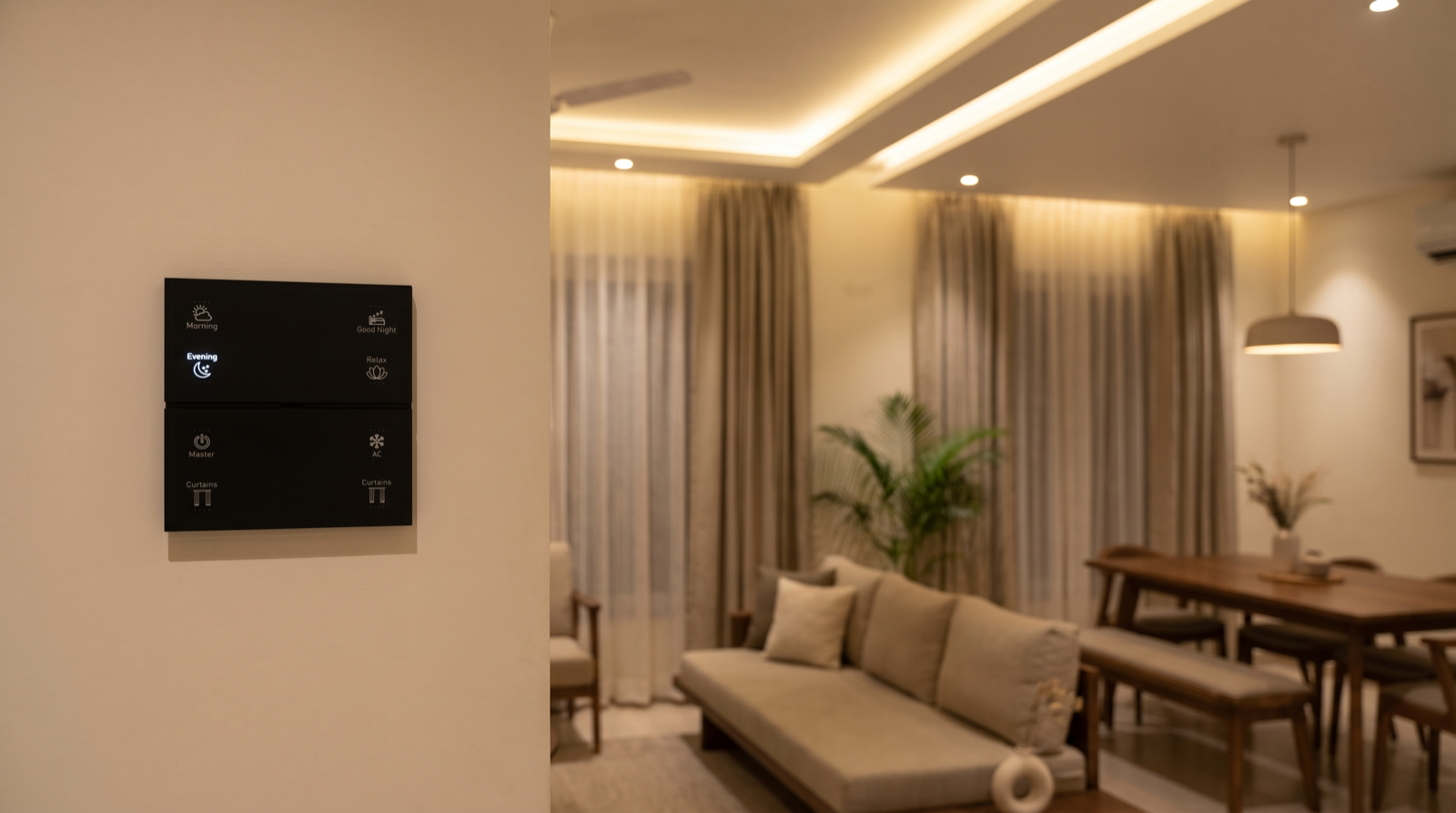
Here is a programming map for an eight-button scene keypad at the entrance to the living and dining area of a 3BHK in Hyderabad, with tunable and dimmable lighting, sheer and blackout motorised curtains and one IR-controlled AC. Upper half: four room scenes. Lower half: house and device control.
| Button | Short press | Press again | Hold | Backlight |
|---|---|---|---|---|
| Morning | Downlights 70% at a cooler white, sheers open, blackouts open | Re-applies the scene | None | Bright while the scene is active |
| Evening | Downlights 40%, cove 70% warm, sheers closed | Re-applies the scene | None | Bright while active |
| Good Night | Living and dining off, sheers and blackouts closed, foyer at 10% for two minutes then off | Re-applies | Runs Good Night for the whole house (owner's shortcut; also on the bedroom keypad as its own button) | Bright for a few seconds as confirmation |
| Relax | Cove 40% warm, downlights off, accent lights on, sheers closed | Re-applies | None | Bright while active |
| Master | All living and dining lights off, AC off, curtains unchanged | Nothing (off-only) | None | Brief flash to confirm |
| Curtains (sheer) | Opens if closed, closes if open | Stops if moving | None | Shows open or closed |
| AC | Sends "on, 24°C, auto fan" | Sends "off" | None | Follows the last command sent |
| Curtains (blackout) | Opens if closed, closes if open | Stops if moving | None | Shows open or closed |
Notice what is not on this keypad: no hold-to-dim on scene buttons, no double presses, no button whose meaning changes depending on what was pressed before. The cove gets hold-to-dim on a separate two-button functional keypad by the sofa, where it is the only light that button controls. More scene recipes like these are in how to design home automation scenes.
Mistakes that make a keypad confusing
- Scene buttons that toggle off. One person sets Dinner, another presses Dinner to "make sure", and the table goes dark.
- A Master that toggles back on. Master should only ever switch off.
- Hidden functions nobody else knows. If only one person in the house knows that a double press on Relax opens the blackouts, that function does not really exist.
- Hold-to-dim on a mixed scene. Holding a button that controls lights, curtains and AC together has no sensible meaning.
- A toggle that always comes on at 100%. Fine at 7 pm, harsh at 2 am. Use a time-aware level.
- Labels that do not match behaviour. A button engraved "Lights" that actually recalls a scene with curtains will surprise people. Decide behaviour first, then engrave.
- AC toggles that drift out of sync because the original remote is also used.
- Different behaviour for the same label in different rooms. If Good Night is off-only in one bedroom and a toggle in another, family members will get it wrong. Keep one rule per label across the house.
How Pert delivers it — a designed solution, not a DIY kit
Pert designs and installs the whole system: keypads, tunable and dimmable lighting, motorised curtains and security devices, working together over Zigbee through the Pert gateway. Before any faceplate is engraved, we agree a button schedule with you that lists, for every keypad in the home, what each button does on a short press, what pressing it again does, whether it has a hold function, and what its backlight shows. That schedule is used for programming and commissioning, every button is tested in front of you at handover, and it goes into your handover document so anyone can see what a button is meant to do. If daily life shows that a button should behave differently, we change the programming without touching the wiring.
Planning home automation for a Hyderabad flat or villa? We will design the keypads, scenes, lighting, curtains and security as one system, with every button's behaviour planned and documented, so the whole family can use it without a manual. Request a consultation →
Comparing installers? Ask each one whether they provide a written button schedule before engraving, what a second press on a scene button will do, and whether button functions can be changed later without rewiring. Those questions sit alongside the wider checklist in best home automation companies in Hyderabad.
Frequently asked questions
What is the difference between a toggle button and a scene button on a smart keypad?
A toggle button controls one light or group and flips it: press once for on, press again for off. A scene button sets several devices to stored levels and positions at once, for example dining lights at 60%, cove at 30% and sheer curtains half-closed. Pressing a scene button again usually re-applies the scene rather than switching everything off, unless it has been designed as a scene toggle. Which behaviour each button gets is decided during design and set when the system is programmed.
Can one keypad button dim the lights as well as switch them?
On many systems, yes: a short press toggles the light and pressing and holding raises or lowers the brightness, often alternating direction each time you hold. Whether a particular keypad supports hold-to-dim depends on the model and how it is programmed. It works best on a button that controls one dimmable group, such as the living room cove, rather than on a scene button that controls many different loads.
Should keypad buttons have hidden double-press or long-press functions?
Use them sparingly. A long press that dims the same light the button already controls feels natural. A hidden function that does something unrelated, such as a double press that locks the door, will be forgotten by family members and never discovered by guests or elders. As a rule, every function that someone other than the owner needs should have its own labelled button, and hidden presses should only add convenience to what the button already does.
Can button functions be changed after the keypad is installed?
Yes. In a Zigbee system the button sends an event to the gateway, and what that event does is set in the system's programming, so a button can be reassigned from a single light to a scene, or have its press-again behaviour changed, without rewiring. The only thing that is fixed is the engraved label, so if a button's job changes completely, the faceplate may need re-engraving. That is why behaviour and labels are planned together before engraving is ordered.