
In this guide
- What a scene actually is — and what it is not
- Six rules for a scene that gets pressed
- Before the scenes: getting the circuit split right
- Eight worked scenes, with the numbers
- The bedroom set — a second, smaller vocabulary
- Buttons, schedules and sensors: what triggers what
- Fade times, and why they matter more than you think
- Seven mistakes that leave a scene unpressed
- How Pert delivers it (designed, not DIY)
- FAQs
This article is part of our wider coverage of home automation in Hyderabad, and it deals with the layer that turns a collection of controllable devices into something a household actually lives with. If you are still deciding whether scenes are worth building at all, start with why scene-based automation beats app-only devices — this guide assumes you are past that and want to know what goes into one.
What a scene actually is — and what it is not
A scene is a single named instruction that sets a defined group of devices to defined states, over a defined transition time. Press Dinner and the pendant over the table goes to 60 percent, the cove drops to 20 percent, the downlights in the living area go to 15 percent, the kitchen work light goes off, the sheers close, and all of it happens over three seconds.
What a scene is not:
- It is not a group. A group turns several lights on together at whatever level they happen to be at. A scene fixes the level of each one individually, which is the entire point — the contrast between circuits is what makes a room look designed.
- It is not a schedule. A schedule decides when. A scene decides what. The two are separate, and the same scene should be reachable from a button, a schedule and a voice command without being rebuilt three times.
- It is not an on state. The most useful scenes in most homes are the ones that turn things off selectively. Good Night is a scene. Away is a scene.
- It is not per-device control with a nicer name. If your Evening scene simply switches on everything in the living room, you have built a group and labelled it a scene, and the household will notice within a week.
Six rules for a scene that gets pressed
- Name it after a moment, not a setting. “Dinner” and “Movie” are moments; anyone in the house knows when to press them. “Scene 3”, “Warm 40” and “Living 2” are settings, and settings do not get pressed by anyone except the person who programmed them.
- Build in contrast. A room where every circuit sits at 60 percent looks flat and slightly institutional. The same room with one layer at 60 percent, a second at 30 and a third at 10 looks like a hotel lobby. Aim for a ratio of roughly 4:1 between the brightest and dimmest visible layer in any relaxed evening scene.
- Go warmer as the evening goes on. Cool white light after about 8pm suppresses melatonin and makes a home feel like a workplace. A house that runs 4000K in the morning, 3000K in the evening and 2200K at night is following the same curve people's bodies already run on. Our room-by-room colour temperature guide covers the reasoning in full.
- Every scene must include everything in its zone. The most common failure is a scene that sets six circuits and ignores the seventh, so the reading lamp stays at 100 percent while everything else drops to 20 and ruins the effect. A scene should state a value for every circuit in its scope, including “off”.
- Never build a scene that cannot be undone in one press. If Movie takes a room to near-darkness, the same keypad must carry an Evening or All On button within reach. Scenes that trap a household are scenes a household stops trusting.
- Set it in the room, after dark, sitting where people sit. Dim levels chosen on a laptop at 2pm are wrong. This is the single highest-value hour in an automation project and the one most often skipped.
Before the scenes: getting the circuit split right
You cannot design good scenes on a bad circuit split, and the split is decided during wiring — long before anyone thinks about scenes. If a living room's cove, downlights and accent spots all sit on one dimmer, there is exactly one scene available to you: that room at some brightness. For scenes to have anything to work with, a living and dining area needs a minimum of five or six separately dimmable circuits:
- Cove or perimeter — the ambient layer, and the one that does most of the work in an evening scene.
- General downlights — split into at least two groups if the room is longer than about 5m, so the sofa end and the entry end can differ.
- Accent and wall wash — spots on the feature panel, art, or the TV wall.
- Dining pendant — always its own circuit. It is the single most useful dimmable point in the house.
- Decorative and floor lamps — on switched or dimmed sockets, so a scene can include them. A floor lamp that a scene cannot reach is a hole in every scene.
- Low-level or step glow — the 2200K night layer, on its own so it can survive when everything else goes to zero.
Add the motorised curtains as controllable positions rather than simply open or closed, and the same room suddenly has enough vocabulary for a dozen distinct looks. Where the fixture types belong — cove, COB, strip and spot — is set out in our guide to planning cove lighting in a false ceiling.
Eight worked scenes, with the numbers
Below is a complete scene set for the living and dining area of a typical Hyderabad 3BHK or villa ground floor, written out the way we would issue it on a commissioning sheet. Treat the numbers as a well-tested starting point rather than gospel — ceiling height, wall colour, floor finish and how much daylight a flat gets will all move them by ten percent or so, which is precisely why the final numbers get set on site.
1. Morning — 6:00am to 9:00am
The job here is to help people wake, find things and get out of the door. This is the one scene in the house where cool light is correct.
| Circuit | Level | CCT |
|---|---|---|
| Cove / perimeter | 60% | 4000K |
| Downlights (both groups) | 75% | 5000K |
| Accent / wall wash | Off | — |
| Dining pendant | 70% | 4000K |
| Floor and table lamps | Off | — |
| Sheer curtains | Open 100% | — |
| Blackout curtains | Open 100% | — |
Fade: 2 seconds. Trigger: schedule at 6:00am on weekdays, plus a button on the master bedroom and kitchen keypads. Accent lighting is off because nobody is admiring a feature wall before breakfast, and leaving it out saves the scene from looking fussy.
2. Day — 9:00am to 5:00pm
The most valuable scene in an Indian home and the one people forget to build. Hyderabad gets roughly 300 usable-daylight days a year, and a well-glazed flat needs almost no artificial light between mid-morning and late afternoon. A Day scene is mostly an instruction to stop burning electricity.
| Circuit | Level | CCT |
|---|---|---|
| Cove / perimeter | Off | — |
| Downlights — entry group | Off | — |
| Downlights — interior group | 40% | 4000K |
| Accent / wall wash | Off | — |
| Dining pendant | Off | — |
| Sheer curtains | Closed 100% | — |
| Blackout curtains | West glazing closed 60% after 2pm | — |
Fade: 3 seconds. Trigger: schedule at sunrise plus 90 minutes. The sheers stay closed rather than open because a closed sheer on a Hyderabad afternoon still delivers plenty of light while cutting glare and a significant slice of solar heat gain — the point we make in detail in smart curtains and energy savings. The interior downlight group stays at 40 percent because the middle of a deep flat never gets enough daylight, and that one circuit removes the reflex of switching on the whole room.
3. Evening — the default look
This is the scene the household will press more than all the others combined. It should be the most attractive setting in the house, and it should be one button, on the keypad by the door people come home through.
| Circuit | Level | CCT |
|---|---|---|
| Cove / perimeter | 55% | 3000K |
| Downlights — entry group | 30% | 3000K |
| Downlights — interior group | 20% | 3000K |
| Accent / wall wash | 60% | 2700K |
| Dining pendant | 35% | 2700K |
| Floor and table lamps | On, 70% | 2700K |
| Low-level / step glow | 30% | 2200K |
| Sheer curtains | Open 100% | — |
| Blackout curtains | Closed 100% | — |
Fade: 3 seconds. Trigger: button on the entrance and living keypads, plus an automatic run at sunset if nobody has pressed anything. Note the spread: the accent layer at 60 percent is the brightest thing in the room, the interior downlights at 20 percent are the dimmest, and the eye reads that as depth. Note also that the blackouts close — after dark, an uncovered window is a black mirror that reflects the room back at itself and flattens everything you just built.
4. Dinner
The scene that looks the most expensive and costs the least to build. Everything except the table steps back.
| Circuit | Level | CCT |
|---|---|---|
| Dining pendant | 60% | 2700K |
| Cove / perimeter | 20% | 2700K |
| Downlights (both groups) | 15% | 2700K |
| Accent / wall wash | 25% | 2700K |
| Kitchen work light | Off | — |
| Floor and table lamps | On, 40% | 2700K |
| Low-level / step glow | 30% | 2200K |
Fade: 3 seconds. Trigger: button on the dining and kitchen keypads. Two details do the work. First, the kitchen work light goes fully off — an open-plan kitchen at 100 percent behind a dining table wrecks the scene more than any other single circuit. Second, 60 percent on the pendant is deliberately not 100: a pendant at full output over a table is glary at eye level and washes the food out.
5. Movie
Near-darkness done properly. The mistake here is going to zero, which makes the screen uncomfortable to watch for long stretches and means anyone getting up walks into furniture.
| Circuit | Level | CCT |
|---|---|---|
| Cove / perimeter | 10% | 2700K |
| Downlights (both groups) | Off | — |
| Accent / wall wash | Off | — |
| Bias light behind screen | 15% | 2200K |
| Dining pendant | Off | — |
| Low-level / step glow | 10% | 2200K |
| Blackout curtains | Closed 100% | — |
Fade: 5 seconds. Trigger: button on the living keypad. A slow five-second settle is the whole trick — it reads as the lights going down in a cinema rather than as somebody flicking a switch. The bias light behind the screen at 2200K reduces eye strain by lifting the surround out of pure black, and it costs a couple of watts. Anything that indicates status with a bright LED — a set-top box, a router shelf — is worth relocating or taping over at this point; it will be the brightest thing in the room otherwise. The full media-room treatment is in our guide to home theatre and media room automation.
6. Relax
Between Evening and Movie: reading, conversation, the last hour before bed.
| Circuit | Level | CCT |
|---|---|---|
| Cove / perimeter | 30% | 2700K |
| Downlights (both groups) | Off | — |
| Accent / wall wash | 35% | 2700K |
| Floor and table lamps | On, 60% | 2700K |
| Dining pendant | 15% | 2700K |
| Low-level / step glow | 30% | 2200K |
Fade: 3 seconds. Trigger: button on the living keypad. Every ceiling downlight is off, which is what separates this from a dimmed version of Evening — overhead light is what makes a room feel like a room you are working in rather than one you are sitting in.
7. Good Night
A whole-house scene, and the one that makes the strongest case for automation to anyone sceptical. One press at the bedside replaces a four-minute walk around a dark house.
| Zone | Action |
|---|---|
| Living, dining, kitchen | All circuits to off |
| Corridor and staircase | 2200K pathway layer at 8%, motion-boost armed |
| Bathrooms | 2200K night light at 5%, motion-triggered |
| Balcony and outdoor display layer | Off |
| Outdoor security and path layer | 2200K at 10%, remains on until sunrise |
| Master bedroom | Bedside lamps at 20%, all else off |
| Curtains, all rooms | Blackouts closed 100% |
| Security | Perimeter door and window sensors armed, cameras to night mode |
Fade: 6 seconds. Trigger: long-press or dedicated button on the master bedside keypad, plus an automatic run at 1:15am as a fallback for the nights nobody presses it. The pathway layer is not optional — the point of the scene is that the house goes dark safely, and a household that has to switch a light on to reach the bathroom at 2am will abandon the scene inside a fortnight. Tying the door sensors and cameras into the same press is what turns it from a lighting scene into a genuinely useful piece of automation; see smart home security in Hyderabad for how those pieces should work together.
8. Away
Not a look, but a state. Everything off, everything safe, and a presence pattern running in the evenings.
| Zone | Action |
|---|---|
| All interior lighting | Off |
| All curtains | Sheers closed, blackouts open (so the house does not read as shut up) |
| Non-essential switched sockets | Off — geyser, iron point, decorative lamps |
| Outdoor display layer | Astro schedule, sunset to 10:30pm |
| Presence pattern | Living at 40% and one bedroom at 30%, 7:15pm to 10:45pm, start time varied ±20 minutes nightly |
| Security | Full arm, motion alerts on, camera recording on motion |
Fade: 2 seconds. Trigger: button on the entrance keypad, pressed on the way out. The randomised start time matters: a house that lights up at exactly 7:15pm every night for a week is more obviously empty than one that never lights up at all. The blackouts stay open deliberately — a home with every blackout drawn for four days in a row is a signal, and an open blackout behind a closed sheer gives privacy without announcing an empty house.
The bedroom set — a second, smaller vocabulary
Bedrooms should not inherit the living-room scene list. They need three or four of their own, on a bedside wall keypad within arm's reach of the pillow:
- Wake — a slow lift from 0 to 60 percent at 3000K rising to 4000K, over 25 minutes, ending at the alarm time, with the sheers opening in the last five minutes. This is the single most-liked scene in most homes we hand over, and it is impossible to do with a switch.
- Read — bedside lamps at 70 percent 2700K, cove at 15 percent, everything overhead off. Ideally one button per side of the bed so one person can read while the other sleeps.
- Night — everything to zero except a 2200K floor-level glow at 5 percent on the path to the bathroom door, with a 4-second fade.
- Bright — 100 percent at 4000K, everything on. Unglamorous and absolutely necessary: it is the scene for finding an earring, packing a suitcase or dealing with a sick child at 3am, and a bedroom without one will have its automation overridden the first time it is needed.
Keypad placement is what makes or breaks these — bedside at 750mm above floor, on the outer side of the bed, is covered in how to plan keypads in a home.
Buttons, schedules and sensors: what triggers what
The same scene should be reachable several ways, but each trigger type has a job it is good at.
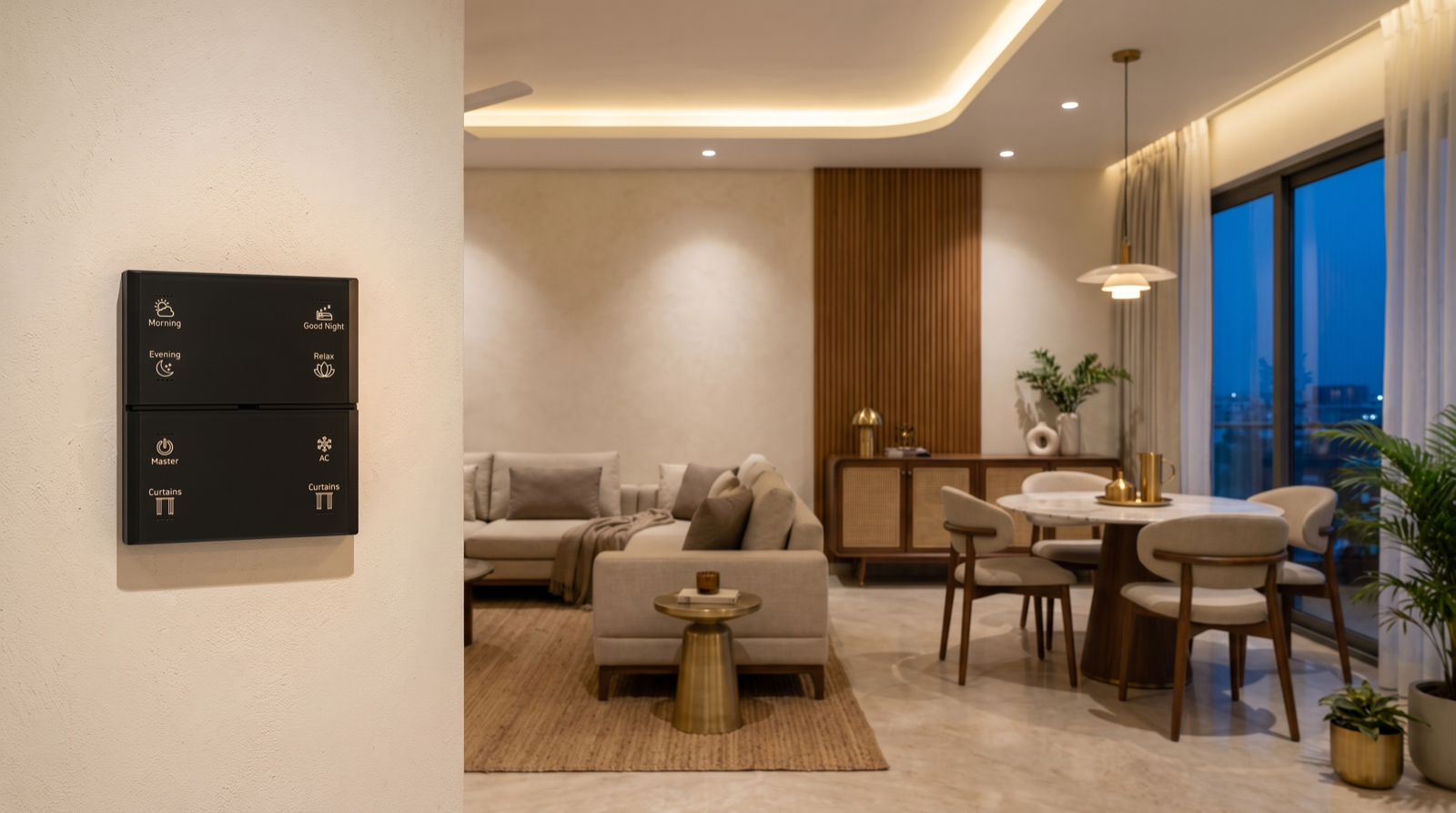
- Keypad buttons — for anything a person decides in the moment: Evening, Dinner, Movie, Relax, Good Night, Away. A decision made standing in the room should be one press away, which is the practical argument in do you need an app, a keypad, or both.
- Schedules — for anything that happens at roughly the same time daily regardless of who is home: Day at sunrise plus 90 minutes, the outdoor layer on an astro clock at sunset, the 1:15am Good Night fallback. Always use an astronomical clock rather than a fixed time for anything tied to daylight; Hyderabad's sunset moves about 45 minutes across the year.
- Sensors — for transitional spaces only: corridors, staircases, utility areas, bathrooms at night. Occupancy-triggered, low output, and never in a living room, where a sofa full of people watching a film reads as an empty room within about ten minutes.
- Voice — as a convenience layer over the same scenes, never as the only way to reach one. Voice is excellent when your hands are full and useless when the internet is down.
- Conditions — the refinement that makes a system feel intelligent. The entrance button should run Day before sunset and Evening after it. A single button that does the right thing at both 3pm and 9pm is worth more than two buttons that each do one thing.
Fade times, and why they matter more than you think
Fade time is the least-specified setting in home automation and one of the biggest contributors to whether a system feels premium or cheap. A rough scale:
- 0.5 to 1 second — task scenes where someone wants light now: kitchen, bathroom, utility, anything triggered while walking through a door.
- 2 to 3 seconds — everyday living scenes: Morning, Evening, Dinner, Relax.
- 4 to 6 seconds — Movie and Good Night, where the slow settle is the effect.
- 20 to 30 minutes — a sunrise wake scene, slow enough that nobody perceives it switching on.
Three rules go with those numbers. Never fade an occupied room to zero instantly at night — it is startling and leaves people momentarily blind. Keep the fade consistent across every room in a house-wide scene, so Good Night settles as one movement rather than as a ragged sequence. And check the fade on the actual fittings after installation: a poorly matched driver will step visibly through the low end of a long fade instead of gliding, which is a hardware problem, not a programming one, and it is covered in why LED lights flicker or buzz when dimmed.
Seven mistakes that leave a scene unpressed
- Too many scenes. Twelve buttons means one gets used. Four means all four do.
- Everything at 100 percent. The installer default. It is not a scene, it is a group with a name.
- Forgetting a circuit. One lamp left at full while the rest drop to 20 ruins the whole effect, and the household blames “the automation” rather than the omission.
- No way back. A dark scene with no bright scene within reach on the same keypad breeds distrust fast.
- Levels set in daylight. Numbers chosen at 2pm on a laptop are always too bright when the sun goes down.
- Unlabelled buttons. An unengraved keypad is a keypad only one person in the household ever uses. Engrave the names, and use the same word in every room.
- Never revisiting them. Scene levels should be reviewed once, roughly six to eight weeks after handover, when the family has actually lived with them. Almost every set gets one or two useful adjustments at that visit, and a provider who does not offer it is not really finishing the job — the wider point in home automation maintenance and support in Hyderabad.
How Pert delivers it — a designed solution, not a DIY kit
Pert is a solutions company: we design and install. Scene design sits at the end of our process, but it is planned from the very beginning, because the circuit split that makes good scenes possible is decided during wiring. At the design stage we produce a lighting and control drawing that fixes the dimmable circuit groups per room, the keypad positions and gang counts, and the scene names that will be engraved on each button — so the electrician runs the right number of circuits and the keypad plates are manufactured with the right labels rather than left blank.
After installation, we commission on site after dark. That means sitting in each room at the hour it will actually be used, setting the level of every circuit in every scene by eye from where people sit, choosing the fade time per scene, tying the motorised curtains and security devices into the whole-house scenes, and then walking the household through the finished set so everyone — including parents and staff who will never open an app — knows what the buttons do. We supply and install the tunable and dimmable lighting and the wall keypads that make this possible, and we return around six to eight weeks later to adjust the scenes once the family has lived with them.
If you are comparing providers, ask a direct question: who sets the scene levels, and when? If the answer is that the app comes with presets, or that the levels get set during a daytime handover, you are buying installed devices rather than a designed system. Our guide to the best home automation companies in Hyderabad covers the rest of what to check, and the questions to ask before you hire puts them in order.
Planning automation for a home in Hyderabad? The circuit split that makes good scenes possible is decided during wiring — once the ceiling closes, the number of scenes your home can have is fixed. Request a consultation →
Frequently asked questions
How many scenes should a home actually have?
Far fewer than most people expect. The right number is four to six scenes per room and six to eight house-wide scenes, and the discipline is what makes them work. A keypad with four well-chosen buttons gets pressed every day; a keypad with twelve buttons gets one button pressed and the rest ignored, because the moment a household has to read a keypad rather than reach for it, they stop using it. The reliable test is frequency: a scene earns a button only if someone will trigger it several times a week. In a typical 3BHK the house-wide set is Morning, Day, Evening, Dinner, Movie, Relax, Good Night and Away, and each room then carries three or four local scenes drawn from that same vocabulary so the names mean the same thing everywhere. Anything more specific — a Diwali look, a party setting, a guest-arriving scene — belongs in the app, where it costs nothing to keep and nobody has to walk past it every day.
What dim levels and colour temperatures should each scene use?
As a working baseline for an Indian home: a Morning scene at 70 to 80 percent brightness and 4000K to 5000K to help people wake and get out of the door; a Day scene that runs mostly on daylight with curtains open and only task lighting at 40 to 60 percent at 4000K; an Evening scene at 50 to 60 percent and 3000K as the default living-room look; a Dinner scene with the dining pendant at 60 percent and everything else dropped to 15 to 20 percent at 2700K; a Movie scene with the cove at 10 percent, downlights off and a low 2200K back-glow behind the screen; a Relax scene around 25 to 30 percent at 2700K; and a Good Night scene where everything goes to zero except a 2200K pathway layer at 5 to 10 percent. Two principles matter more than any single number. First, warmer as the evening goes on — cool white after about 8pm suppresses melatonin and makes a living room feel like an office. Second, contrast is what makes a scene look designed: the difference between a room at a flat 60 percent everywhere and the same room with one layer at 60 percent and the rest at 15 percent is the entire difference between lit and styled.
What fade time should a scene use?
Fade time is the most under-specified setting in home automation and the one that most determines whether a system feels premium. Use roughly one second for a task scene where someone wants light now — a kitchen or bathroom scene, or anything triggered while walking through a doorway. Use two to three seconds for the everyday living scenes: Evening, Dinner, Relax. Use four to six seconds for Movie and Good Night, where a slow settle reads as cinematic rather than sluggish. And use a genuinely long fade, twenty to thirty minutes, for a sunrise-style wake scene that lifts a bedroom from zero to 60 percent so gradually that nobody perceives it as switching on. The one rule that never changes: never fade to zero instantly in an occupied room at night, because dropping a room to black in a fraction of a second is startling and leaves people unable to see for several seconds. And keep fades consistent per scene across every room, so a house-wide Good Night settles as one movement rather than as a ragged sequence of rooms.
Should scenes be triggered by buttons, schedules or sensors?
All three, assigned by how predictable the moment is. Buttons on a wall keypad are right for anything a person decides in the moment — Evening, Dinner, Movie, Relax — because a decision made while standing in the room should be one press away, not four taps into an app. Schedules are right for anything that happens at roughly the same time every day regardless of who is home: an outdoor and façade layer on an astro clock at sunset, a Day scene at sunrise, a house-wide fallback that drops everything to the night layer at around 1am in case a scene was never pressed. Sensors are right for transitional spaces where nobody wants to press anything at all — a corridor, a staircase, a utility area, a bathroom at night — and should almost always be occupancy-triggered with a low-level output rather than a full-brightness switch-on. What does not work is trying to make sensors do the job of buttons in a living room, because a sofa full of people watching a film reads as an empty room to a motion sensor within about ten minutes.