
In this guide
- A command is not a confirmation
- How devices report their state, and which ones can only estimate
- What a keypad LED should mean
- Why the app and the wall disagree, and how to design it out
- After a power cut: power-on behaviour and re-sync
- A worked feedback plan for a 3BHK
- Seven feedback mistakes
- How Pert delivers it (designed, not DIY)
- FAQs
This article is part of our wider coverage of home automation in Hyderabad. It builds on what a smart home gateway does and how a Zigbee mesh network works. Those explain how a command travels through the house; here we follow the message that comes back.
A command is not a confirmation
Every action in an automated home is a round trip. When you press a button on a Stella keypad, three things should happen in order:
- Command. The keypad tells the gateway which button was pressed, and the gateway sends the matching instructions to the lights, curtains or other devices over the Zigbee mesh.
- Action. Each device carries out its part: a relay switches, a dimmer ramps to 40%, a curtain motor starts moving.
- Report. Each device sends its new state back to the gateway: “I am on, at 40%”, “I am closed”. The gateway updates its record of the house, and from that record it lights keypad LEDs, refreshes the app and answers voice assistants.
A system with only steps 1 and 2 is one-way: it fires instructions and assumes they landed. A system with step 3 is two-way: what you see is what the devices themselves reported. The difference is invisible on day one and very visible six months later, when a device has been changed by hand, has lost power, or briefly dropped off the mesh. A one-way system keeps showing what it last sent; a two-way system shows what is true, or tells you it does not know.
Zigbee, the protocol Pert's system is built on, is designed for the two-way model. Devices can send reports to the gateway whenever their state changes, plus a periodic check-in so the gateway notices if a device has gone quiet. Whether that actually happens in your home depends on how each device is set up — which is a design decision, not something that comes free in the box.
How devices report their state, and which ones can only estimate
Not every device knows its own state equally well. Before deciding what a keypad LED or the app should show, it helps to be honest about what each kind of device can actually tell the gateway.
| Device | What it reports | How reliable | Design note |
|---|---|---|---|
| Switching relay (light circuit, fan, socket) | On or off | Exact, because the relay knows its own contact position | Safe to drive a status LED |
| Dimmer / dimmable driver | On or off plus level (e.g. 40%) | Exact for the level it is set to | Show “on” for any level above 0%, not only at 100% |
| Tunable light | Level plus colour temperature | Exact | Scene LEDs should check both values, not just on/off |
| Curtain motor | Open, closed or a position such as 30% | Good once end limits are set; position is worked out from travel, so a curtain pulled by hand can confuse it | Set limits carefully at installation; let a full open or close re-zero it |
| Door / window contact sensor | Open or closed, plus battery level | Exact when it changes; battery devices sleep in between and check in periodically | Good for “balcony door open” warnings on a keypad or phone |
| Motion / presence sensor | Motion detected, then clear after a hold time | Reports activity, not “someone is in the room” for certain | Never use motion alone as proof a room is empty; see sensor-triggered automations |
| IR-controlled AC or TV | Nothing — infrared is one-way | The system only knows the last command it sent | Do not put an IR device on a status LED unless something else confirms it |
The last row matters in Hyderabad homes, where split ACs are among the most-used loads. If the AC is driven by infrared and someone uses its own handheld remote, the system has no way to know. That is not a fault; it is a limit of infrared. The honest design is to say so in the feedback plan and avoid promising an AC status light that cannot be trusted.
What a keypad LED should mean
A backlit keypad button can mean three quite different things, and confusion starts when a house mixes them up. Decide once, write it down, and use the same rule on every keypad.
| LED role | Used on | Lit means | Goes out when |
|---|---|---|---|
| Load status | Buttons that switch one light, group or device (Master, a reading light, a fan) | The device reports that it is on | The device reports off — including when it was turned off from the app, another keypad or a routine |
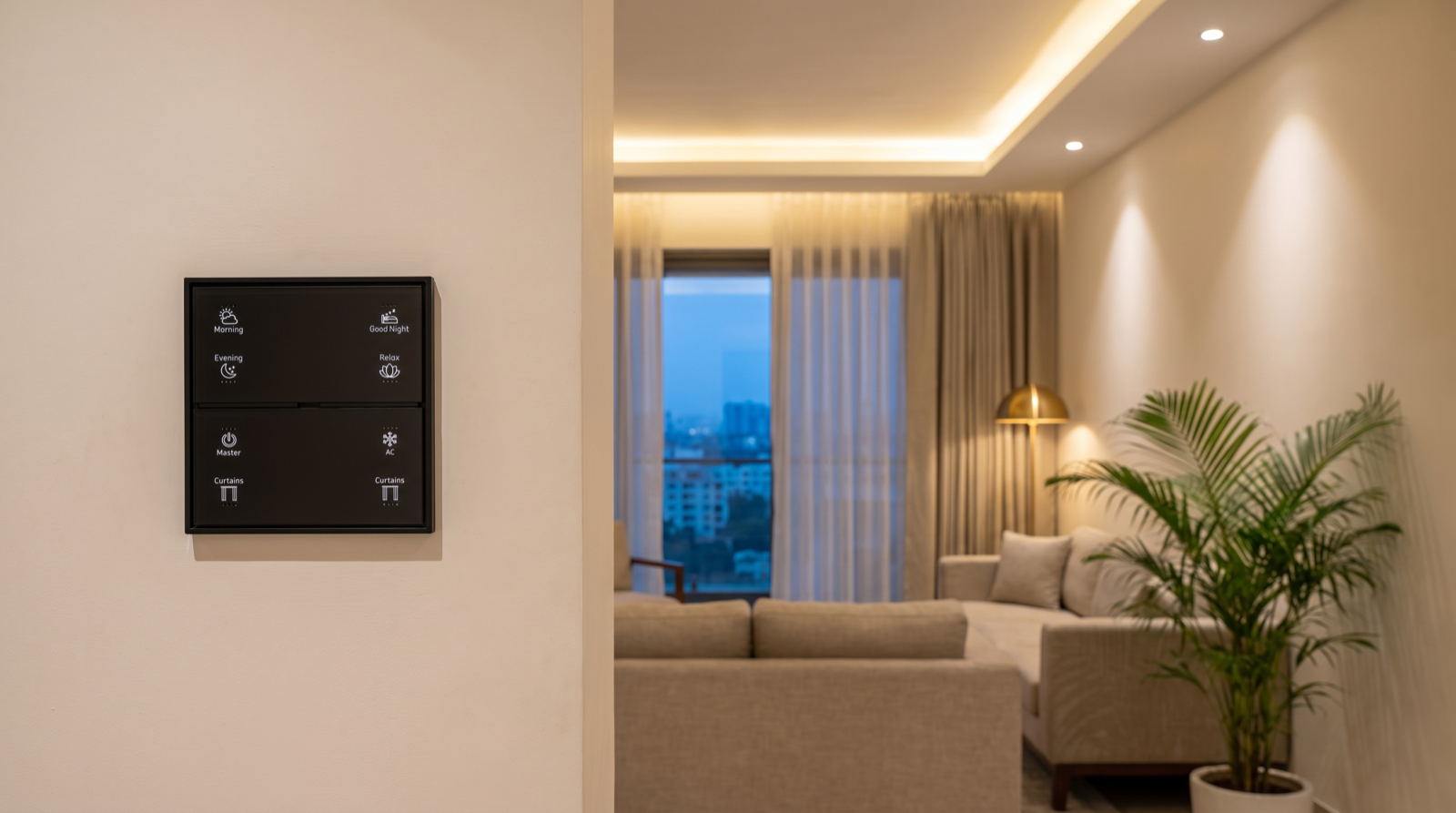
| Scene active | Scene buttons (Morning, Evening, Relax, Good Night) | Every device in the scene is still at the scene's settings | Anyone changes a device in that scene, or another scene replaces it |
| Locator backlight | All buttons, at night | Nothing about state — it just lets you find the button | Day mode, or never; keep it dim so it does not light a bedroom |
Three rules that keep LEDs trustworthy
- Drive status LEDs from the report, not from the press. If the button lights up the moment you press it, before the device has answered, a failed command still looks like success. The LED should follow the device's report, which normally arrives in well under a second.
- A scene LED must “break”. If Relax stays lit after someone turned the cove to full, the LED is lying. Scene indicators should go out as soon as any member of the scene moves away from its setting.
- Curtain buttons need their own convention. A curtain is not on or off. A common, clear choice: the Curtains LED is lit when the curtain is open more than a set amount (say 10%), and off when fully closed. On the reference Stella layout, with Curtains appearing twice, one button can be the sheers and one the blackouts, each with its own LED.
These choices connect directly to keypad layout and engraving: the label on the button and the meaning of its light should be decided together.
Why the app and the wall disagree, and how to design it out
When a family says “the app is wrong”, it is almost always one of six causes. Each one has a design answer.
| What you see | Usual cause | Design answer |
|---|---|---|
| App shows a light as on; it is off and will not respond | A conventional switch upstream cut power to a smart light or driver, so it went offline holding its last report | Never wire a smart load behind a plain switch. Replace or bypass the old switch so the keypad is the control |
| App shows the AC off; it is running | Someone used the AC's own remote; infrared cannot report back | Keep IR devices off status LEDs, or add a way to confirm the AC is running |
| Curtain shows 30%, actually fully open | Curtain pulled by hand, or end limits drifted | Set limits properly at installation; a full open or close re-zeroes the position |
| One room is always a few seconds late, or sometimes misses an update | A weak link in the Zigbee mesh, often behind concrete walls or a metal door frame | Plan mains-powered routers to fill the gap; see why home automation becomes unreliable |
| Door sensor shows closed but door is open | Battery low, or magnet misaligned after the door was adjusted | Battery warnings in the alert plan; check alignment at handover |
| State is right in the app but a keypad LED is wrong | The LED was tied to the last button press, not to the device report | Re-link the LED to the device's reported state |
There is also a subtler case: two controls acting on the same device at nearly the same moment, such as a routine dimming the living room while someone presses Relax. The device ends up in one state and reports it; the feedback is correct, but the outcome may surprise you. That is a question of priorities, covered in how home automation resolves conflicts, overrides and timers.
After a power cut: power-on behaviour and re-sync
Power cuts are where feedback design gets tested. Two separate questions decide what happens.
1. What does each device do when power returns?
Mains-powered smart devices have a power-on behaviour: when supply comes back, they stay off, switch on, or restore whatever state they were in before. The right choice depends on the load and on what time the power is likely to return.
| Load | Sensible power-on behaviour | Why |
|---|---|---|
| Bedroom and living-room lights | Stay off | A 3am power return should not light up the house and wake everyone |
| One entrance or passage light | Restore last state | If it was on for safety before the cut, it comes back on |
| Outdoor and facade lights | Stay off; let the evening schedule re-apply | The gateway turns them back on if it is still within the scheduled hours |
| Curtain motors | Stay where they stopped | Curtains should never move on their own when power returns |
| Fans and sockets on relays | Restore last state, case by case | A fan running in a sleeping child's room should come back on |
Which loads are on inverter or generator backup changes this picture, so power-on behaviour is set alongside the backup plan, not after it. Do smart homes work during power cuts? covers the backup side in detail.
2. How does the gateway find out what is true?
When the gateway restarts, its record of the house may be out of date: devices may have restored, stayed off, or had their state changed while it was down. A well-set-up gateway re-reads the state of every device once the mesh has re-formed, which usually takes a minute or two after power returns, and only then lets keypad LEDs and the app show status. Until then, the honest display is “unknown” rather than a confident but stale “off”.
A worked feedback plan for a 3BHK
Here is how feedback might be written down for a 3BHK flat with a Stella keypad at the entrance, the living room and each bedside, dimmable and tunable lighting, motorised sheers and blackouts, and door contacts on the main and balcony doors from the security range.
| Where | Button / signal | Feedback |
|---|---|---|
| Entrance keypad | Master | Lit if any light in the home is on — one glance on the way out tells you if something was left on |
| Living keypad | Evening, Relax | Scene-active LEDs; go out when anyone adjusts a light or curtain in the scene |
| Living keypad | Curtains × 2 | One for sheers, one for blackouts; lit when open more than 10% |
| Living keypad | AC | Locator backlight only — no status LED, because the AC is on infrared |
| Bedside keypads | Good Night | Lit while Night mode is active; blinks briefly if the balcony door is open when pressed |
| All keypads | Backlight | Dim locator glow from sunset; bedside keypads dimmer than living-room ones |
| Phone | Alerts | Balcony door left open after Good Night; a device offline for more than 15 minutes; low sensor battery |
Notice that the plan is as much about what the system will not claim as what it shows. Phone alerts follow the rules in how to design smart home notifications: only things you would act on.
Seven feedback mistakes
- LEDs that follow the press. The button lights before the device has answered, so a failed command looks like success.
- Scene LEDs that never break. Relax stays lit long after the room has been changed.
- Status lights on infrared devices. An AC LED that is wrong half the time teaches the family to ignore every LED.
- Smart loads behind ordinary switches. The single biggest cause of “offline” devices and stale app states.
- Default power-on behaviour everywhere. The whole house lighting up at 3am when the power returns.
- Bright backlights in bedrooms. A locator glow that is bright enough to read by is too bright to sleep by.
- No offline alert. A sensor with a dead battery fails silently for weeks. Ask any installer how you will know when a device stops reporting; it is a good question to add to the list in best home automation companies in Hyderabad.
How Pert delivers it — a designed solution, not a DIY kit
Pert's Stella keypads, tunable and dimmable lighting, motorised curtains and sensors and security devices work together as one Zigbee system through the Pert gateway. We design and install the whole system rather than handing over a kit, so feedback is planned, not left to defaults. During design we decide which buttons show load status, which show scene status and which only glow at night; we make sure no smart load sits behind a conventional switch; and we set power-on behaviour per circuit alongside your inverter plan. At handover we test feedback the way you will live with it: changing devices from the app, from a second keypad and by hand, cutting and restoring power, and checking that every LED and app tile tells the truth afterwards.
Planning home automation for a Hyderabad flat or villa? We will design the whole system, from keypads and lighting to curtains, security and the feedback that tells you it all worked, around how your household actually lives. Request a consultation →
Frequently asked questions
Why does my smart home app show a light as off when it is actually on?
The app shows the last state the gateway received. If the device could not report back, the app keeps showing an old state. The usual causes are a conventional switch that cut power to a smart light, a device changed by a remote or by hand, a weak spot in the Zigbee mesh, or a device not set up to report. A designed system removes each of these: no smart loads behind plain switches, a mesh planned for coverage, and every device set to report changes.
What should the LED on a smart keypad button mean?
It depends on the button type, and it should be the same across the house. On a button that switches one load or group, the LED shows the real state of that load, taken from the device's report. On a scene button such as Relax or Good Night, the LED shows the scene is active and goes out when anything in it is changed. Any button can also have a dim night backlight so you can find it in the dark.
What happens to smart lights and curtains after a power cut?
Each powered device has a power-on behaviour: stay off, come on, or restore its previous state. A designed system sets this per load — usually off for most lights so the house does not light up at 3am, and last state for a few safety lights. Curtains stay where they stopped. When the gateway restarts it re-reads every device so the app and keypad LEDs match reality again.
Can the system know whether an AC is really on?
Only if it is connected in a way that reports back. With infrared control, the system knows only the last command it sent, so using the AC's own remote breaks the match. A designed system says this honestly, keeps an IR-controlled AC off status LEDs, and where reliable AC status matters uses a connection that reports state or a sensor that confirms the AC is running.