
In this guide
- How a smart home talks to a split AC
- The one-way problem: why the app can be wrong
- Placing IR blasters: line of sight, range and Wi-Fi
- AC in scenes and keypads: Good Night, Leaving, Welcome
- Schedules and sensor automations for Hyderabad summers
- A room-by-room AC plan and common mistakes
- How Pert delivers it (designed, not DIY)
- FAQs
This article is part of our wider coverage of home automation in Hyderabad. It builds on sensor-triggered automations (the trigger, condition and action logic used below) and time, sunrise and sunset routines, and applies both to the single biggest electrical load in most bedrooms.
How a smart home talks to a split AC
The remote is the interface
A wall-mounted split AC has a small infrared receiver behind the display window on its indoor unit. Every button on the handheld remote sends a burst of invisible infrared light, coded in that manufacturer's format. An IR blaster is a small device that produces those same bursts on command. When a keypad button, a schedule or the app asks for "AC on, cool, 24°C", the blaster sends exactly what the remote would have sent, and the AC has no way of knowing the difference. Pert's IR Blaster works this way: it controls infrared devices such as the AC and TV and connects to the home over Wi-Fi.
Why AC remotes are easier to automate than TV remotes
A TV remote sends toggles: "power" means "change whatever the power state is". An automation that sends "power" to a TV that is already off turns it on. Most split-AC remotes work differently. Each press sends the full state — power, mode, set temperature, fan speed and often swing — in one packet. That is why the handheld AC remote shows a display: it holds the state and transmits all of it every time. For automation this is a gift. A Good Night scene can send "on, cool, 26°C, fan low" and the AC ends up in exactly that state regardless of what it was doing before. We confirm this behaviour for each AC model at commissioning, because a handful of models and older units still use toggle codes for some functions.
Code libraries and learning
During setup the blaster is matched to the AC in one of two ways. Most common brands and models are covered by a built-in code library: the installer picks the brand, tests a few codes and confirms the AC responds correctly to mode, temperature and fan. When a model is not in the library, the blaster can learn from the original remote by recording its signals. Learning an AC is more work than learning a TV, because each combination of mode, temperature and fan is a separate full-state code, so in practice we learn only the handful of states the family's scenes actually use. Either way, it is a commissioning job — not something to leave half-finished.
What about ACs that are not split units?
| AC type | How it is usually controlled | What to plan |
|---|---|---|
| Wall-mounted split (most Hyderabad flats) | IR blaster in the room | One blaster per room with an AC; confirm codes at commissioning |
| Cassette or hi-wall in a living area | IR blaster, same as a split | Line of sight from a high point; large rooms may need careful placement |
| Ducted or VRF/VRV central system (larger villas) | The AC manufacturer's own controllers or integration gateway | Assess at design stage with the HVAC contractor; do not assume IR will work |
| Window AC | IR blaster if it has an IR remote | Check that it has a remote at all; many older units do not |
The one-way problem: why the app can be wrong
Your smart lights and curtain motors report their state back over Zigbee, so the keypad backlight and the app show the truth. Infrared does not work that way. The blaster sends; the AC listens; nothing comes back. The system therefore knows the last command it sent, not the AC's confirmed state. Three situations create a gap:
- Someone uses the handheld remote. The AC changes, the system does not see it. The app still shows the last state it sent.
- A command is missed. Someone is standing between the blaster and the AC, or the blaster was moved, so the AC never received the signal.
- The AC restarts after a power cut. Many ACs have an auto-restart feature and come back in their previous state; others stay off. The system cannot tell which happened.
How good design narrows the gap
- Send absolute states, not toggles. Every scene and schedule says exactly what it wants — "off", or "cool 25°C fan auto" — so a wrong assumption is corrected the next time any automation runs.
- Prefer "off" commands for safety. Sending "off" to an AC that is already off does nothing harmful, so leaving routines and master-offs can always send it without checking.
- Put the handheld remote away. Families who use keypads and the app for the AC, and keep the original remote in a drawer, get an app that is almost always right.
- Place blasters for clear line of sight (next section), so missed commands are rare.
- Use the label honestly. On the keypad, an AC button is best treated as "set my preferred AC state" rather than as a status light you rely on.
Placing IR blasters: line of sight, range and Wi-Fi
Most "my AC automation is unreliable" problems are placement problems. Infrared behaves like light: it travels in straight lines, bounces a little off pale walls and does not pass through walls or closed cabinet doors. The Pert IR Blaster's range is typically up to 10 metres, which comfortably covers a bedroom or a living room, but only if it can "see" the AC.
| Rule | Why | Typical spot |
|---|---|---|
| One blaster per room with an AC | IR does not pass through walls; a blaster in the living room cannot reach the bedroom AC | Each bedroom, living, home office |
| Clear line of sight to the indoor unit | People, wardrobes and open doors block the beam | TV unit, bookshelf or high wall opposite or diagonal to the AC |
| Not behind curtains that move in scenes | A Good Night scene that closes the curtain in front of the blaster then cannot reach the AC | Keep it on the room side of every curtain track |
| Out of direct afternoon sun | Strong sunlight carries infrared and can swamp receivers on west-facing walls | A shaded shelf rather than a sunny sill |
| Strong 2.4 GHz Wi-Fi at the spot | The blaster receives its commands over Wi-Fi | Check signal during the site survey, not after |
| Power that stays on | A blaster on a switched socket disappears when someone turns the socket off | An unswitched point planned in the electrical layout |
Because the blaster is a Wi-Fi device, its reliability depends on the home network. If you are still planning access points, our guide to planning Wi-Fi and network for a smart home explains how to make sure every bedroom has a solid 2.4 GHz signal.
AC in scenes and keypads: Good Night, Leaving, Welcome
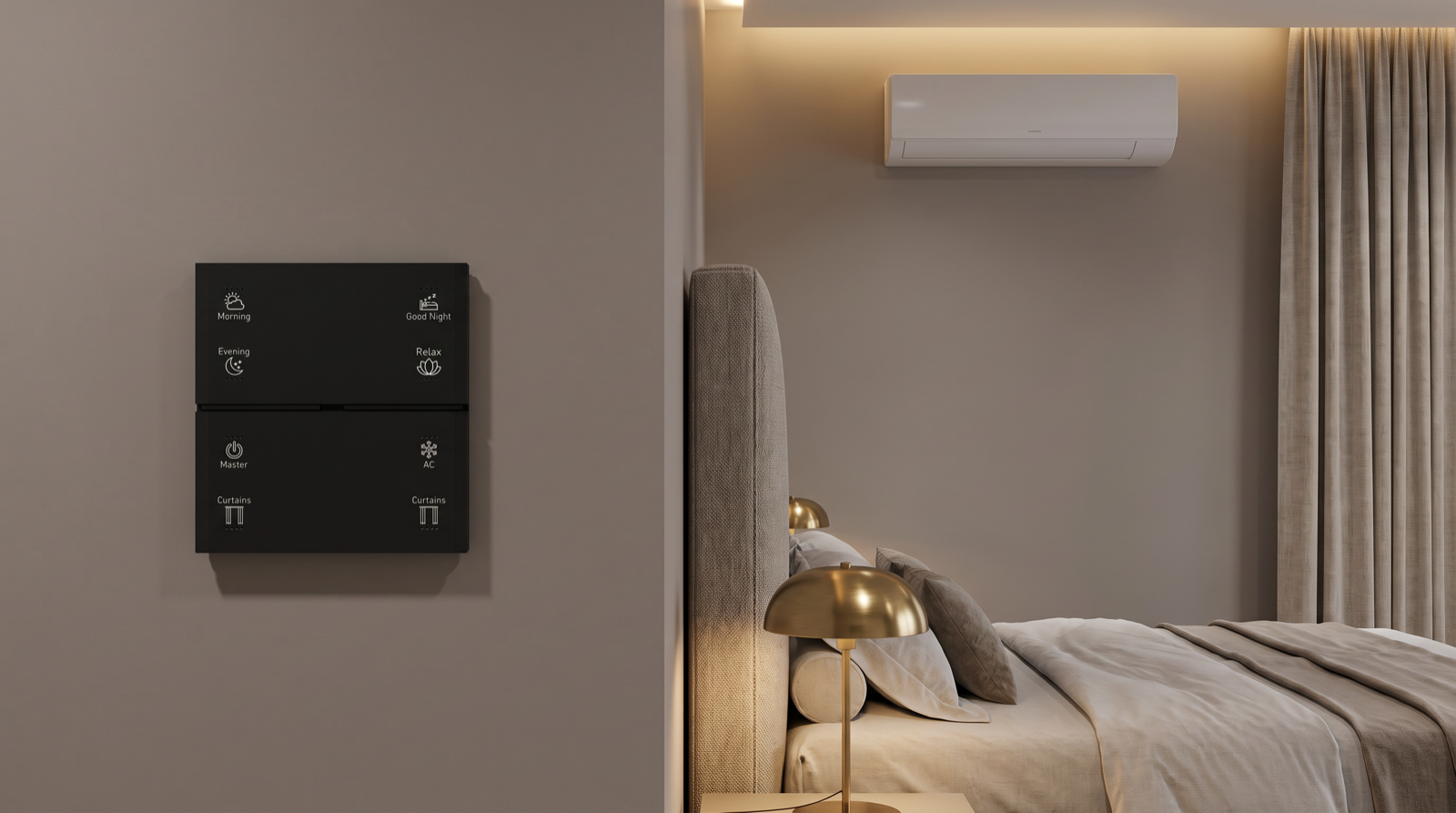
The AC becomes genuinely useful when it stops being a separate device and becomes part of the moments you already press a button for. On the Pert Stella keypad, AC sits alongside Good Night, Relax, Master and Curtains, so the same wall that sets the room's lighting and curtains also sets its comfort. These are the AC roles we design into scenes most often:
| Scene / button | What the AC does | What else happens |
|---|---|---|
| AC (bedroom keypad) | Tap: the family's preferred state, e.g. cool 25°C, fan auto. Second button or app for off | Nothing else; a simple, predictable comfort button |
| Good Night | Cool 26°C, fan low (or sleep mode where the AC has one) | Room lights off, blackout curtains closed, passage to night level |
| Morning | Off | Curtains open to daylight, lights to a bright morning level |
| Relax (living) | Cool 24°C | Cove and accent lighting low, sheers closed |
| Leaving / Master off | Off in every room | All lights off, curtains closed, security armed |
| Welcome (from the app before you reach home) | Living and master bedroom AC on, 24–25°C | Foyer and living lights on as you walk in |
Two details make these feel right. First, scenes send the AC command before the curtain command when the blaster sits near a window, so the beam is never blocked. Second, temperatures are agreed with the family, not picked by the installer. The Bureau of Energy Efficiency recommends 24°C as the default setting for room ACs and estimates that each degree higher saves roughly 6 percent of the AC's electricity, which is why we usually start Good Night at 25–26°C and let families adjust from there.
Schedules and sensor automations for Hyderabad summers
Every automation below follows the same trigger, condition, action pattern. They are written for a typical Hyderabad summer, with daytime highs above 40°C in April and May and warm nights, and switched off or relaxed in the monsoon and winter by a simple seasonal mode.
Time-based
- Overnight step-up. Trigger: 3:00 am. Condition: master bedroom AC was set by Good Night. Action: raise to 27°C. The room has cooled and so have you; the higher setting saves energy and avoids waking up cold.
- Morning off. Trigger: the weekday Morning scene or 7:00 am. Action: bedroom AC off, curtains open. No AC left running in an empty bedroom all day.
- Afternoon heat shield. Trigger: 1:30 pm on summer days. Action: close west-facing sheers or blackouts. This is not an AC command at all, but it reduces how hard the AC works in the evening. See smart curtains and energy savings in Hyderabad for why this matters on west and south walls.
Sensor-based
- Balcony door open. Trigger: a door contact on the balcony door opens. Condition: the AC in that room was last set on, and the door stays open for 3 minutes. Action: notify, then send AC off. The grace period stops the AC switching off every time someone steps out to collect laundry.
- Empty study or guest room. Trigger: no motion for 30 minutes in a room with a motion or microwave sensor. Condition: daytime only. Action: AC off. We deliberately do not use this in bedrooms at night: a sleeping person barely moves, and a motion sensor will decide the room is empty.
- Leaving the house. Trigger: the Leaving button at the main door, or away mode. Action: every AC off. Because "off" is always safe to send, this runs for every room whether the system thinks the AC is on or not.
Rules that should never be automatic
- Turning an AC on in a bedroom based only on temperature or time when nobody may be there.
- Switching off the AC in a room where an elderly parent or an infant is sleeping because a sensor saw no movement.
- Any rule that fights the person in the room: if someone changes the AC from the keypad, a schedule should not silently undo it ten minutes later.
Where AC automation saves electricity, it is mostly through these "off" and "step-up" rules rather than clever cooling.
A room-by-room AC plan and common mistakes
This is the kind of plan we draw for a typical Hyderabad 3BHK with ACs in the living room and all three bedrooms, before a single device is ordered:
| Room | Blaster location | Buttons / scenes | Automations |
|---|---|---|---|
| Living | TV unit, facing the hi-wall AC | Relax, Movie, Welcome, Leaving | Balcony door off-rule; Leaving off |
| Master bedroom | Shelf opposite the bed, room side of the curtain track | AC, Good Night, Morning on both bedsides | 3 am step-up; Morning off; balcony door off-rule |
| Bedroom 2 (children) | High wall diagonal to the AC | AC, Good Night | Morning off on school days; no motion-based off at night |
| Bedroom 3 / study | Bookshelf facing the AC | AC on the door keypad | 30-minute no-motion off, daytime only |
| Main entrance | — | Leaving (hold) | All ACs off, with lights, curtains and security |
Mistakes we are called in to fix
| Symptom | Cause | Fix |
|---|---|---|
| AC ignores Good Night but works from the app in the day | Scene closes the curtain in front of the blaster before sending the AC command | Move the blaster to the room side, or send AC first |
| Bedroom AC randomly switches off at night | Motion-based "room empty" rule applied to a bedroom | Remove it from bedrooms; use time-based step-up instead |
| App shows AC on, room is warm | Someone turned it off with the handheld remote, or a command was missed | Absolute-state commands, better placement, remote kept away |
| Bedroom AC cannot be controlled at all | Blaster in the living room, trying to reach through a wall | One blaster per AC room |
| Blaster goes offline every few days | Weak 2.4 GHz Wi-Fi in the bedroom, or blaster on a switched socket | Fix coverage; move to an unswitched point |
How Pert delivers it — a designed solution, not a DIY kit
Buying an IR blaster gives you a remote in your phone; designing AC automation gives you a home that stays comfortable without being thought about. On every project our team lists every AC by room, brand and type; flags ducted or central systems for a separate assessment; marks blaster positions and unswitched power points on the electrical plan with line of sight to each indoor unit; checks Wi-Fi strength at each spot; matches and tests codes for every mode, temperature and fan state the scenes use; builds the AC into the family's keypad scenes, schedules and leaving routine; adds door-sensor and occupancy rules only where they make sense; and walks the family through what the AC button does before handover. Pert's keypads, lighting, curtains, security sensors and IR Blasters are programmed as one system around the Pert gateway, so the AC behaves like part of the home rather than an app on the side.
If you are comparing who should design and install yours, best home automation companies in Hyderabad sets out the questions to ask — including how they handle devices, like the AC, that cannot report their own state.
Want your ACs to switch off when you leave, ease up at night and stop cooling empty rooms? We will map every AC, blaster position and routine on your floor plan and commission it room by room. Request a consultation →
Frequently asked questions
Can I automate my existing split AC without replacing it?
In most cases, yes. A split AC already accepts commands from its infrared remote, and an IR blaster sends the same signals, so the AC cannot tell the difference. The blaster is matched to the AC at commissioning, from a built-in code library or by learning the original remote. After that, the AC can be part of keypad scenes, schedules, sensor automations and app or voice control. Ducted and VRF central systems are different and are assessed separately at the design stage.
Why does the app not always know whether my AC is on?
Infrared is one-way. The blaster sends a command but the AC sends nothing back, so the system knows the last command it sent rather than the AC's confirmed state. If someone uses the handheld remote, the system does not see it. Good design narrows the gap: most AC remotes send the full state with every press, so automation commands are absolute rather than toggles, and blasters are placed with a clear line of sight so commands are not missed.
Where should an IR blaster be placed for an AC?
In the same room as the indoor unit, with a clear line of sight to its receiver window — usually a shelf, TV unit or high wall opposite or diagonal to the AC. Infrared does not pass through walls, so each AC room normally needs its own blaster. Keep it out of direct afternoon sun, out of closed cabinets and on the room side of any curtain that closes in a scene, and make sure the spot has strong 2.4 GHz Wi-Fi.
Should the AC turn off automatically when a balcony door is opened?
It is one of the most useful AC automations, but it should be gentle. A door contact notices the balcony door open while the AC is running; after a grace period of two to five minutes the system notifies you and then switches the AC off if the door is still open. The delay stops the AC switching off every time someone steps out briefly. When the door closes, the AC can be restored or left off, as the family prefers.