
In this guide
- Why names are the real interface: one name, four places
- A naming pattern that scales: Room → Zone → Device → Qualifier
- Naming rooms in Indian flats and villas
- Naming lights, curtains and sensors: good and bad examples
- Naming scenes and modes so they match the keypad
- Voice-friendly names for Alexa and Google Home
- The naming schedule you should get at handover
- Eight naming mistakes to avoid
- How Pert delivers it (designed, not DIY)
- FAQs
This article is part of our wider coverage of home automation in Hyderabad. It assumes you already know roughly what a scene and a routine are; if not, start with how to design home automation scenes. Here the focus is narrower and very practical: what to call everything, and why it matters.
Why names are the real interface: one name, four places
In a designed Zigbee system, every keypad button, light circuit, curtain motor and sensor is a separate device on the Pert gateway. Each one gets a name, and that name travels:
| Where the name appears | Who sees or says it | What a bad name causes |
|---|---|---|
| App — device tiles, room lists, scene list | Family members, sometimes staff | Scrolling through Light 1–24 to find the dining pendant; switching off the wrong room |
| Voice — Alexa or Google Home | Everyone, including elders and children | “Which one did you mean?”, or a command that quietly controls a different device |
| Keypad engraving — scene and device buttons | Everyone, especially guests and staff | Button says Relax, app says Lounge Mood; people stop trusting either |
| Alerts, history and logs | Family, and the installer when troubleshooting | “Contact sensor 3 opened at 2:14am” with no idea which door |
The goal is simple: one thing, one name, everywhere. The name on the keypad, in the app, in the voice app and in the alert should be the same, or obviously related. That is why naming belongs in the design stage, not the last hour of installation.
A naming pattern that scales: Room → Zone → Device → Qualifier
A 3BHK flat can easily have 40–70 named devices once every light circuit, curtain layer, keypad, sensor and lock is counted, and a villa can have well over a hundred. A consistent pattern keeps that list readable. The one we recommend has up to four parts, and you only use as many as you need:
- Room — where it is: Living, Dining, Master Bedroom.
- Zone (optional) — a part of a large room: Sofa, TV Wall, Balcony Side.
- Device — what it is, in plain words: Cove, Downlights, Pendant, Sheer, Blackout, Door Sensor.
- Qualifier (optional) — only when two similar devices share a room: Left, Right, Window, Bed Side.
| Device | Name in the system | Why it works |
|---|---|---|
| Cove strip in the living false ceiling | Living Cove | Room + device; nothing else needed |
| Downlights over the sofa | Living Sofa Downlights | Zone separates them from the TV-wall downlights |
| Pendant over the dining table | Dining Pendant | Short, unique, easy to say |
| Sheer layer on the living-room balcony door | Living Sheer | Layer named the way people think about curtains |
| Blackout in the master bedroom | Master Bedroom Blackout | Clear in both app and voice |
| Door contact on the utility balcony | Utility Balcony Door | Reads naturally in an alert: “Utility Balcony Door opened” |
| Two wall lights either side of a bed | Master Bedroom Reading Left / Right | Qualifier only where it is genuinely needed |
Two rules make the pattern work. First, always start with the room, so app lists sort sensibly and a name is never ambiguous on its own. Second, describe what a person sees, not what an electrician wired: Living Cove, not Living Ch2 or DB-L3. Circuit numbers belong in the technical records, not on the family's phone.
Naming rooms in Indian flats and villas
Rooms are the top level of everything: app grouping, voice assistant rooms and “all off” commands. A few patterns come up in almost every Hyderabad home.
- Use what the family actually says. If everyone calls it the Hall, do not name it Living Room in the app. If the household says Pooja Room, use that.
- Prefer roles over people. Kids Bedroom, Parents Bedroom and Guest Bedroom outlast Arjun's Room, because children grow up, parents visit for months and rooms become studies. If a person's name is how the family speaks, it can be a voice nickname while the system name stays neutral.
- Avoid “Bedroom 2”. Numbers make sense on a floor plan but nobody says them. If a room really has no role yet, use its position: Corner Bedroom, Garden Bedroom.
- Split big open-plan spaces deliberately. An open living-dining-kitchen can be one room in the app or three. Three is usually better, because “turn off the dining lights” should not darken the kitchen while someone is cooking.
- Prefix floors in villas. In a G+2 villa, Lounge on two floors causes confusion. Use First Floor Lounge and Terrace Lounge, or name rooms so they are unique without a prefix.
- Give outdoor and service areas real names. Front Porch, Car Porch, Terrace, Utility, Staircase. These matter for security alerts and for leaving-home routines.
Naming lights, curtains and sensors: good and bad examples
Most naming problems come from the first pairing session, when devices get whatever default name appears. Here is what we commonly see when we take over a home with an existing setup, and what we rename it to.
| Bad name | Problem | Better name |
|---|---|---|
| Light 7 | Means nothing to anyone but the installer | Dining Pendant |
| Hall Light / Hall Lights | Two names one letter apart; voice assistants often confuse them | Living Cove / Living Downlights |
| COB 12W Warm | Describes the product, not the place | Bedroom Downlights |
| Curtain | Every room has one | Master Bedroom Blackout |
| Motion 2 | Alerts and automations become unreadable | Staircase Motion |
| Main Door | Is it the lock, the contact sensor or the porch light? | Main Door Lock / Main Door Sensor / Porch Light |
| Mom's Light | Unclear to staff and guests; breaks when the room changes use | Parents Bedroom Reading |
Lights
Name lights by layer, because that is how scenes and people think about them: Cove, Downlights, Spots, Wall Washer, Pendant, Strip, Reading. Each dimmable or tunable circuit from Pert's smart lighting range is one named device. When several circuits always work together, create a group with its own name rather than giving every circuit a vague one. Groups are explained in how group and multi-way control works.
Curtains
Name motorised curtains by room plus layer: Living Sheer, Living Blackout. Add a qualifier only for rooms with several openings: Living Sheer Balcony, Living Sheer Window. A one-word Curtain is the most common naming mistake we fix.
Sensors, locks and cameras
Security devices need the clearest names of all, because they are read in alerts, often at night. Name them by the thing they protect, not by the sensor type: Main Door, Utility Balcony Door, Terrace Door, Staircase Motion. The test is simple: read the alert aloud. “Terrace Door opened at 1:40am” tells you what to do. “Contact 3 opened” does not. How alerts themselves should be designed is covered in how to design smart home notifications and alerts.
Keypads
Keypads are devices too, and they show up in history and troubleshooting. Name each by location: Living Entry Keypad, Master Bedroom Bedside Left Keypad. When a button “stops working”, the installer can see exactly which plate sent which press.
Naming scenes and modes so they match the keypad
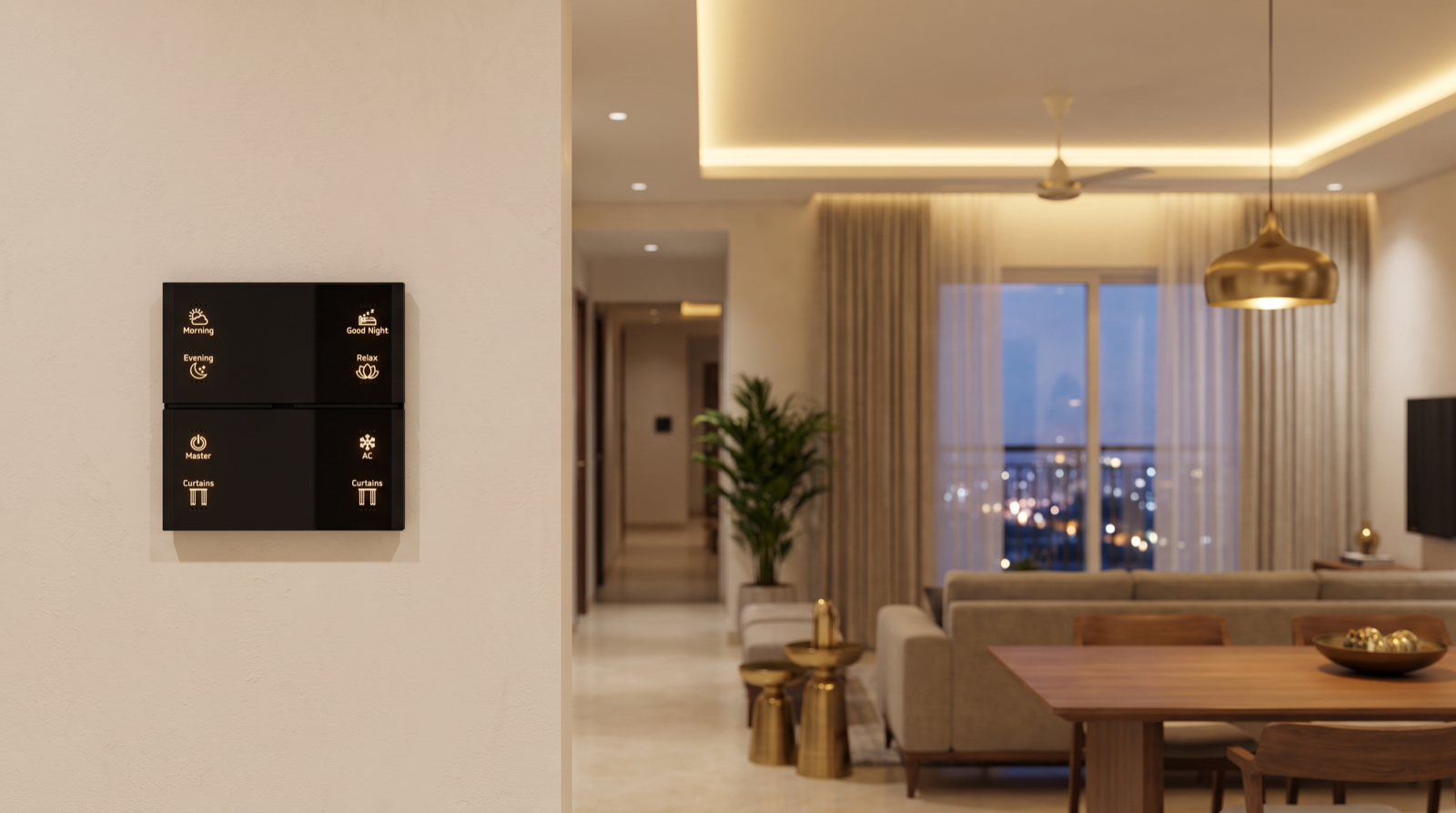
Scenes are the names people use most, because they are what is engraved on the wall. A Stella keypad typically carries labels such as Morning, Evening, Good Night, Relax and Master, alongside device buttons like Curtains and AC. A few rules keep scene names useful:
- The engraved name is the master name. Engraving is the one place that cannot be renamed later, so the app and voice names should match it exactly. If the keypad says Relax, the app scene is Relax, not Chill Mode.
- Name the moment, not the settings. Dinner, Movie, Guests and Reading say when to press it. Cove 40% Warm describes what it does, which nobody needs to know.
- Keep the same word for the same idea in every room. If Relax means soft, warm, curtains partly drawn in the living room, it should mean something similar in the bedroom. Consistency lets a guest use any keypad in the house.
- Separate room scenes from whole-home scenes. Good Night on a bedside keypad might switch off the whole home; Relax on the same plate only affects that bedroom. In the app, prefix whole-home scenes so the difference is visible: Home: Good Night, Home: Leaving.
- Short enough to engrave and to say. One or two words. Long names get shrunk on the engraving and mumbled by voice.
- Modes are not scenes. Home, Away, Night and Guest are states that change how automations behave, not one-time actions. Give them distinct names so nobody confuses an Away mode with a Leaving scene. See how home automation modes work.
Button placement and engraving choices are covered in how to plan keypad layouts and engraving.
Voice-friendly names for Alexa and Google Home
Pert systems can be controlled by Alexa and Google Home, and voice is where poor names fail most visibly. A name that reads fine in an app can be hard to say or easy to mishear. These rules apply to both assistants:
| Rule | Avoid | Use |
|---|---|---|
| Two or three common words | Master Bedroom Ceiling Cove Strip Warm | Bedroom Cove |
| No near-duplicates | Living Light, Living Lights | Living Cove, Living Downlights |
| No numbers or codes | Light 3, L2-Ch4 | Dining Pendant |
| Words everyone can say clearly | Names that elders, children or staff pronounce differently | Simple English words the whole household uses |
| Scene names that do not clash with devices | A scene called Living and a room called Living | Scene Relax; room Living |
| Do not reuse assistant commands as names | A scene called Stop, Off or Alarm | Good Night, Leaving |
Room assignment matters as much as the names. When each device sits in the correct room inside the voice app, “turn off the lights” said to a speaker in the bedroom only affects the bedroom, and “open the curtains in the living room” works without remembering each curtain's exact name. In multilingual Hyderabad households, the practical answer is usually short English device names that everyone already uses, and the occasional familiar nickname for the most-used scenes. Voice setup in more depth is in home automation with Alexa and Google Home in Hyderabad.
The naming schedule you should get at handover
A naming schedule is a simple table, agreed before installation and updated at handover, that lists every device and scene with its name, room and what it controls. It is the single source of truth for the app, voice, engraving and future service visits. A good one looks like this:
| Room | Name | Type | Controlled from | In scenes |
|---|---|---|---|---|
| Living | Living Cove | Tunable light | Living Entry Keypad, app, voice | Morning, Evening, Relax, Movie |
| Living | Living Sheer | Curtain | Living Entry Keypad (Curtains), app, voice | Morning, Evening, Good Night |
| Dining | Dining Pendant | Dimmable light | Dining Keypad, app, voice | Dinner, Evening |
| Utility | Utility Balcony Door | Door sensor | — | Away and Night alerts |
| Whole home | Home: Good Night | Scene | Bedside keypads (Good Night), app, voice | — |
The schedule earns its keep years later. When a device is replaced, the new one takes the old name and every scene, voice command and alert carries on as before; that recovery process is explained in what happens when a smart home device fails. It is also a natural part of the handover and testing checklist.
Eight naming mistakes to avoid
- Leaving default names. Light 1–30 and Switch 4 are the fastest way to make a good system feel broken.
- Naming by product, not place. COB 12W tells the family nothing.
- Two names that sound alike. Hall Light and Hall Lights will confuse every voice assistant.
- Different names in different places. Keypad says Relax, app says Lounge Mood, voice routine says Chill.
- Person-based room names. They date quickly and mean nothing to staff or guests.
- Engraving before names are agreed. Engraving is the only name you cannot edit.
- Sensors named by type. Contact 3 in a 2am alert is useless.
- No written record. Without a naming schedule, every rename and every replacement is guesswork.
How Pert delivers it — a designed solution, not a DIY kit
Pert's Stella keypads, tunable and dimmable lighting, motorised curtains and security devices work together as one Zigbee system through the Pert gateway. We design and install the whole system rather than selling a kit, and naming is part of that design. At consultation we walk the floor plan with the family and note what each room is actually called. The naming schedule is drafted alongside the scene list and agreed before keypads go for engraving. Every device is named and assigned to its room during commissioning, so the app, voice assistants and alerts all read the same way from day one. At handover the family receives the schedule, and when names change after move-in we update it so the records always match the home. Who in the family sees which rooms and devices is a related decision, covered in how to manage smart home access for family, staff and guests.
Planning home automation for a Hyderabad flat or villa? We will design the whole system, including scenes, keypad engraving and a naming schedule your family can actually use, together with your lighting, curtains and security. Request a consultation →
Frequently asked questions
Why does naming matter so much in a smart home?
Because the same name is used in four places: the app, voice commands, keypad engraving and alerts. If a light is called Light 3 in the app, “hall light” by the family and Living on the keypad, nobody can find it quickly, voice commands fail and alerts are confusing. A consistent naming system, agreed at design stage, makes the home easier for everyone, including elders, staff and guests.
Should rooms be named after family members, like “Riya's Room”?
Usually not. Rooms change hands as children grow, parents visit or a room becomes a study, and renaming means updating the app, voice routines and sometimes the engraving. A neutral but familiar name such as Kids Bedroom, Parents Bedroom or Guest Bedroom lasts longer. If the family genuinely says “Riya's room” every day, that can be a voice nickname while the system name stays neutral.
How should I name devices so Alexa or Google Home understands them?
Keep names short, unique and easy to say: two or three common words, no numbers or model codes, and no two names that sound alike, such as Living Light and Living Lights. Put every device in the correct room in the voice app so “turn off the lights” works per room. Scenes used by voice should have distinct names that do not clash with device names or the assistant's own commands.
Can names be changed after the system is installed?
Yes. App and voice names can be changed after move-in, and it is common to adjust a few in the first weeks once the family sees what they actually say. Keypad engraving is the one place that is fixed, so scene names on Stella keypads should be agreed before engraving. In a designed system, the installer updates the naming schedule whenever names change so the app, voice, keypads and records stay in step.
Comparing installers? See our guide to the best home automation companies in Hyderabad for the questions worth asking about commissioning and handover.