
In this guide
- What short-stay hosts actually struggle with
- Guest access: a lock code for every booking
- Check-in, Checkout and Vacant: the three states of a rental
- Guest-proof control: keypads, not apps
- Remote monitoring without spying on guests
- Power cuts, inverters and internet outages
- A worked device plan for a 2BHK short-stay flat
- How Pert delivers it (designed, not DIY)
- FAQs
This article is part of our wider coverage of home automation in Hyderabad. It builds on our guides to how to manage access for family, staff and guests, and how Home, Away, Night and Guest modes work. Here we apply both to a property where the “family” changes every few days.
What short-stay hosts actually struggle with
Talk to hosts who run one to five units in Gachibowli, Madhapur, Kondapur or near Shamshabad and the same problems come up again and again. They are rarely about luxury; they are about handovers, waste and small misunderstandings that end up in reviews.
- Key handover. Flights land at 1am, trains run late and hospital visits are unplanned. Meeting every guest in person, or leaving a key with the watchman, does not scale and is not secure. Copied keys from past guests are a real worry.
- ACs and lights left running. Guests on a fixed tariff have no reason to switch anything off. Two ACs running for a whole day between a checkout and the next arrival is one of the largest avoidable costs in a Hyderabad summer.
- Late check-ins into a dark flat. A tired guest fumbling for switches in an unfamiliar flat at midnight is a poor first impression, and first impressions drive ratings.
- Cleaning-crew and caretaker access. Cleaners need to get in between stays, maintenance visits happen at odd times, and the host needs to know who entered and when.
- Guests confused by switches. With 30 or more switch points in a modern flat, guests press the wrong ones or message the host to ask which switch runs the balcony light.
- Noise and party risk. In a gated community, one loud group can mean complaints from the association and neighbours. Hosts want an early warning without listening in on anyone.
Guest access: a lock code for every booking
The single most useful device in a short-stay flat is a smart door lock that supports time-limited PIN codes. The idea is simple: every booking gets its own code, active only for that stay.
- The guest code starts at check-in time and expires at check-out time. If check-in is 2pm on Friday and checkout is 11am on Monday, the code simply does not work before or after those times. Many hosts add a small buffer, such as 30 minutes after checkout, for a guest who has forgotten a charger.
- A new code for every guest. Codes are never reused between bookings.
- A separate code for the cleaning crew. Valid only during cleaning windows, for example 10:30am to 2pm on changeover days. Each entry is logged against that code, so the host can see when the clean actually started and finished.
- A separate code for the caretaker or property manager. Wider hours, still personal, still logged. If they leave the job, one code is deleted.
- A host code and a physical key. The host keeps a master code, and the mechanical override key stays with the host or caretaker, never in a lockbox by the door.
For a deeper look at choosing the lock itself, the door it is fitted to and how it pairs with a video door phone, see our guide to planning a smart main door lock and video door phone.
| Who | Type of code | When it works | What the host sees |
|---|---|---|---|
| Guest | One code per booking | Check-in time to check-out time (plus a short buffer) | First entry (guest has arrived), last exit at checkout |
| Cleaning crew | Personal, recurring | Changeover windows only, e.g. 10:30am–2pm | Arrival and departure of the crew |
| Caretaker / manager | Personal, wider hours | Daytime every day, or as agreed | Every entry, named |
| Maintenance (electrician, AC service) | One-off temporary code | A single visit window | Entry and exit for that visit |
| Host | Master code + mechanical key | Always | Full log and settings |
The lock log also drives the rest of the flat. The first use of a guest code is the most reliable signal there is that the guest has actually arrived, which is exactly when the Check-in scene should run.
Check-in, Checkout and Vacant: the three states of a rental
A family home moves between Home, Away and Night. A short-stay flat has a simpler cycle that repeats every booking: it sits Vacant, a guest checks in, they stay, they check out, the crew cleans, and it goes back to Vacant. Designing around these three states removes most of the daily host work.
The Check-in (Welcome) scene
This runs automatically when the guest code is used for the first time in a booking. The host can also trigger the pre-cool part from the app 30–45 minutes before a confirmed arrival, so the flat is already comfortable when the door opens.
The Checkout (Reset) routine
This runs after checkout time once the main door has been opened and closed, or when the caretaker confirms the guest has left. It runs again after the cleaning crew’s last exit, so the flat is fully reset however the crew left it.
| Area | Check-in (Welcome) | Checkout (Reset) |
|---|---|---|
| Entrance lighting | Foyer and corridor lights on at a welcoming level the moment the door opens after sunset; outdoor door light already on from dusk on arrival day | Off, except a low entrance light if the host keeps one on for security |
| Living and bedroom lighting | Warm white (around 2700–3000K) at a comfortable mid level in the living room; bedside lamps on low | Every light off, including bathroom and balcony |
| Curtains | Sheers open in daylight to show the view; closed after dark for privacy | Sheers closed, blackout layer closed on sun-facing windows to keep the flat cool |
| AC | Living-room AC pre-cooled to around 24°C from 30–45 minutes before arrival (host-triggered), or on arrival | All ACs off through IR control, whatever state the guest left them in |
| Security | Arrival logged; door events switched to “logging only” so the guest’s comings and goings do not ping the host | Door and balcony sensors checked; the host is told if a balcony door was left open; Vacant alerts re-enabled |
| Keypads | Backlight on so buttons are easy to find in the dark | Guest-level scenes stay available for the crew; nothing to reconfigure |
One detail matters a lot: the Checkout routine should never run while a guest might still be inside. Tie it to the booking’s checkout time and the door having been opened and closed after that time, or have the caretaker confirm. Switching off the AC on a guest with a late checkout is a bad review waiting to happen.
The Vacant state between bookings
Between a checkout and the next arrival, the flat should cost almost nothing to run and look lived-in from outside:
- All ACs and indoor lights off; any light switched on by the crew is switched off again 15–20 minutes after their code is last used.
- Sun-facing curtains closed in the afternoon so the flat does not heat up, which also shortens the pre-cool before the next guest.
- Outdoor door or balcony light on from sunset to around 11pm, so the flat does not look empty for days.
- Door and balcony sensors armed: any entry outside a valid code window sends the host an alert straight away.
Guest-proof control: keypads, not apps
Guests should never need to download an app, pair a phone or learn a system to enjoy the flat. Everything a guest touches should be obvious on the wall.
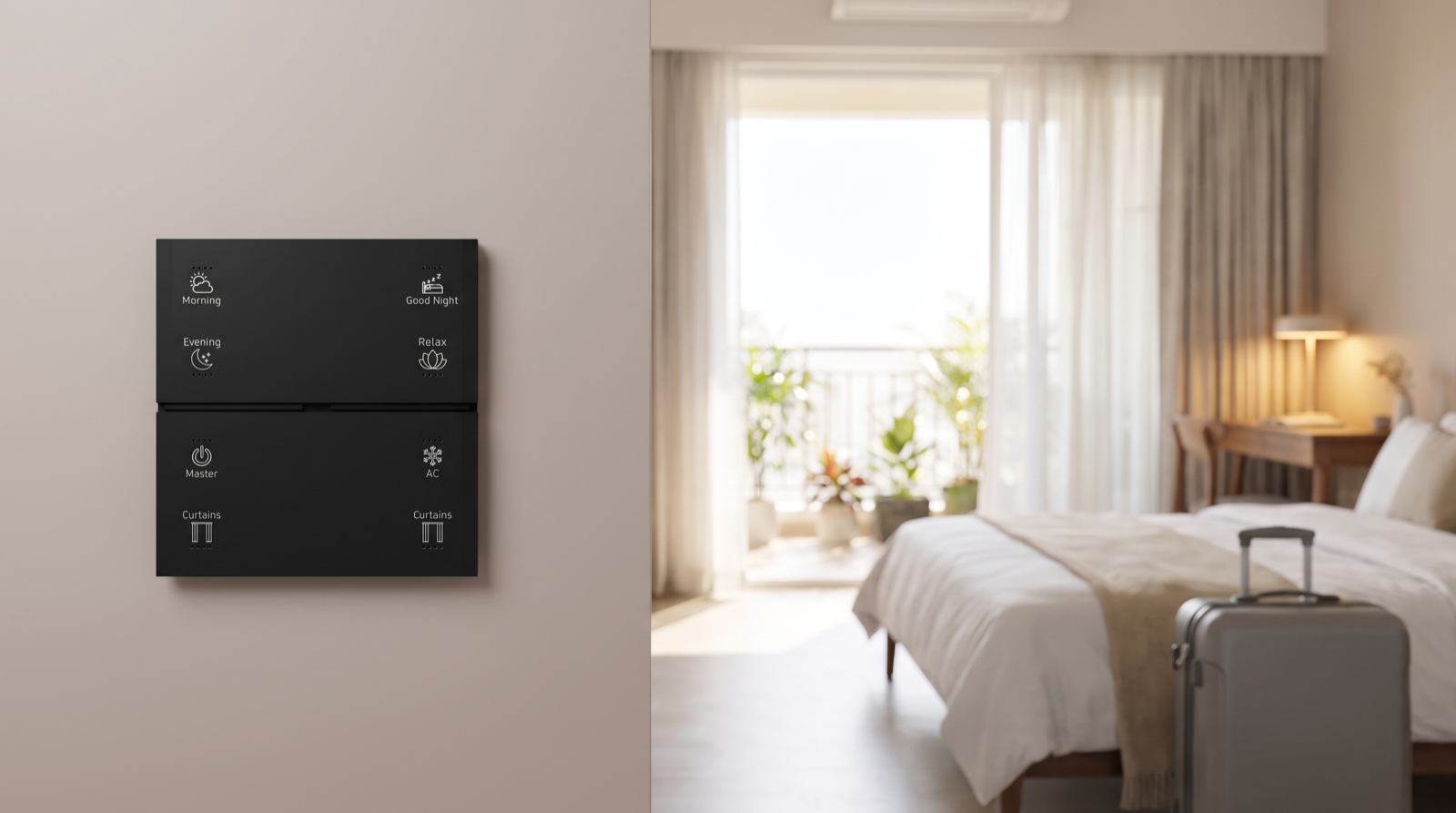
- Labelled Stella keypads. Stella keypads carry engraved, backlit button labels. In a short-stay flat the keypad inside the main door typically uses Evening, Good Night and Master (everything off on the way out); the living-room keypad adds Morning, Relax, AC and Curtains. Guests understand engraved words instantly.
- No owner settings within reach. Guests get scenes and room control. Lock codes, schedules, security settings and the app stay with the host and caretaker.
- A one-page guide. One printed page on the fridge or inside the wardrobe, and the same text in the welcome message: the door code steps, what each keypad button does, how to use the AC, the Wi-Fi details and the caretaker’s number.
- A Good Night that is safe for strangers. In a rental, Good Night switches off living-area lights, closes curtains, leaves a low path light to the bathroom and sets bedroom ACs to a sleep temperature. It does not arm alarms that a guest could trip by stepping out for air.
Remote monitoring without spying on guests
A host needs to know the flat is safe and not wasting power, not what guests are doing. Design the system so that line cannot be crossed.
- No cameras inside the rental. Ever. Not in any room, and not “switched off” ones either. If you use a camera at all, it should cover only the outside of the main door or the entrance, and it must be clearly disclosed in the listing. Check and follow your platform’s rules on cameras and disclosure, and local law, before fitting anything.
- Door alerts that matter. During a stay, guest entries are simply logged. Alerts go to the host only for things that need action: an entry with no valid code window during a Vacant period, the door left ajar for a long time, or the main door opening repeatedly late at night, which can be an early sign of a party.
- Offline alerts. If the gateway or lock goes offline, the host is told, so a dead battery or a tripped circuit is found before the next guest arrives, not when they are standing at the door.
- Energy left on. After checkout or during a Vacant period, the host can see at a glance whether any AC or light is still on and switch it off remotely. During a stay, the guest’s comfort is their business.
- Lock battery level. A low-battery warning is one of the most valuable alerts in a short-stay flat.
Hosts who manage a Hyderabad flat from another city or another country face many of the same questions; our guide to managing a Hyderabad home from abroad covers remote monitoring and local support in more depth.
Power cuts, inverters and internet outages
The host will not be there when the power trips, so plan for it at design time:
- The lock runs on batteries. A battery-powered smart lock keeps opening for stored codes through a power cut. Send the next guest’s code to the lock well before arrival.
- Put the gateway and router on the inverter. The Pert gateway runs scenes and schedules locally on the Zigbee network, so keypads and routines keep working without the internet. On inverter power, alerts and remote access continue too.
- Decide what comes back on. When power returns at 3am, lights should return to off, not every light at full. ACs are usually not on the inverter at all, and the Checkout routine should re-check them after any outage.
- Internet down. Scenes, keypads, schedules and the lock all keep working. Only remote control and phone alerts pause until the connection returns.
A worked device plan for a 2BHK short-stay flat
Here is a typical plan for a 2BHK of around 1,200 sq ft in a gated community near the Financial District, rented mostly to business travellers and families on short visits. It is deliberately modest.
| Area | Devices | Why it is there |
|---|---|---|
| Main door | Smart lock with time-limited PIN codes; door sensor; Stella keypad inside the door (Evening, Good Night, Master) | Code-per-booking access, arrival trigger for Check-in, one-press everything-off on the way out |
| Entrance and outside | Smart foyer lighting; outdoor door light on a sunset schedule; optional disclosed camera facing the outside of the door only | Late check-ins into a lit flat; lived-in look while Vacant |
| Living and dining | Dimmable and tunable lighting; motorised curtains on the main window; AC via IR; Stella keypad (Morning, Evening, Relax, AC, Curtains) | Welcome scene, pre-cool, simple guest control |
| Master bedroom | Dimmable lighting; motorised curtains with blackout layer; AC via IR; bedside Stella keypad (Good Night, Relax, AC, Curtains) | Easy sleep for travellers off red-eye flights; AC reset at checkout |
| Second bedroom | Dimmable lighting; AC via IR; small keypad by the bed | Same reset logic; often used by guests with children |
| Passage and bathrooms | Motion sensor for a low night path light | Safe night movement in an unfamiliar flat |
| Balcony | Door sensor; balcony light | “Balcony door left open” check at checkout; Vacant lighting |
| Electrical cabinet | Pert gateway and router on the inverter | Local scenes and schedules through power cuts |
A typical changeover day then looks like this: 11:00am checkout, and Reset runs once the guest has left; 11:30am the cleaning crew’s code opens the door and the crew uses the keypads to light the rooms; 1:15pm the crew leaves and Reset runs again; the flat sits Vacant with curtains closed; at 1:30pm the host triggers the pre-cool for a 2pm arrival; at 2:10pm the guest code is used for the first time and the Welcome scene sets the lights. The host has made one tap in the app all day.
If you ever sell the flat or switch it to a long-term tenant, codes, schedules and accounts need a clean handover: delete every guest, crew and caretaker code, reset the host account and pass on the one-page guide. And if you are comparing installers for a rental property, our guide to the best home automation companies in Hyderabad lists questions worth asking, including who supports the system when a guest is locked out at midnight.
How Pert delivers it — a designed solution, not a DIY kit
Pert designs and installs complete systems — Stella keypads, tunable and dimmable lighting, motorised curtains, scene automation and security devices including smart door locks and door and motion sensors — working together on one Zigbee network through the Pert gateway, with scenes and schedules running locally in the flat. For a short-stay property we start with how you run it: check-in and checkout times, who cleans and when, who holds the spare key and how far away the caretaker lives. From that we design the Check-in, Checkout and Vacant states, choose keypad labels a stranger understands at midnight, decide which alerts reach your phone, and make sure nothing in the design records guests inside the flat. We install, program and test every routine on site, run a full mock changeover with you, and help you write the one-page guest guide.
Running a short-stay flat or villa in Hyderabad? We design and install lock access, lighting, curtains, keypads, scenes and security for rental properties across the city, planned around your bookings, your cleaning crew and your guests’ privacy. Request a consultation →
Frequently asked questions
Is home automation worth it for an Airbnb or short-stay flat?
For a flat that is booked often, usually yes. The biggest gains are in access and energy: a smart lock with a code per booking removes key handovers and late-night meet-ups, and a Checkout routine switches off ACs and lights that guests leave running. A small, well-chosen system focused on the lock, the entrance, a few keypads and the ACs typically pays back in time saved and power not wasted, without turning the flat into a complicated gadget for guests.
Can I put cameras inside a short-stay rental?
No. Keep cameras out of every room guests sleep, bathe or relax in. A camera covering the outside of the main door or the entrance is the most a host should consider, and it should be clearly disclosed in the listing. Check and follow your platform’s rules on cameras and disclosure, and local law. For everything else, door sensors, offline alerts and device status tell you what you need to know without recording guests.
Do guests need to download an app to use the automation?
They should not. In a well-designed short-stay flat, guests open the door with a PIN code sent with their booking and control the flat with labelled wall keypads and ordinary switching. The app stays with the host and caretaker. A one-page guide on the fridge or in the welcome message explains what each keypad button does.
What happens to lock codes and scenes during a power cut or internet outage?
A battery-powered smart lock keeps working through a power cut, and codes already stored on the lock continue to open it. In a Zigbee system where the gateway runs scenes and schedules locally, keypads and routines keep working when the internet drops, as long as the gateway is powered, ideally from the inverter. What pauses is remote control and alerts to the host’s phone, and new codes cannot be sent to the lock remotely until the connection returns, so codes for the next guest are best set well before arrival.