
In this guide
- Why smart homes stop being used
- Who needs to know what
- The five-minute walkthrough for a new person
- Keypad labels and placement: the real teaching tool
- Elderly parents, domestic staff and guests
- A one-page house guide for the guest room or kitchen
- The two-week follow-up
- How Pert delivers it (designed, not DIY)
- FAQs
This article is part of our wider coverage of home automation in Hyderabad. It focuses on the people side of a system. For the technical side of who can do what, read our guide to managing access for family, staff and guests; for how buttons behave when pressed, held or pressed twice, see how smart keypad buttons work.
The example home: a 4-bedroom villa in a gated community on the western side of Hyderabad. Two parents, a teenager and a 9-year-old, a grandparent who lives with the family, a daytime house-help, a cook who comes in the evening, a driver and frequent guests during festivals. The system has Stella keypads at the main door, in the living room, beside every bed and in the guest room, tunable and dimmable lighting, motorised curtains in the living room and bedrooms, ACs controlled by IR, door and motion sensors, cameras and a smart door lock at the main door. Everything runs on one Zigbee network through the Pert gateway.
Why smart homes stop being used
When families tell us their automation “doesn’t really get used,” the cause is almost never a faulty device. It is one of a small number of very human problems.
- The app became the switch. If the only way to dim a light or close a curtain is the phone, everyone without the app (or without the patience) stops using that feature.
- Too many buttons. A keypad with eight buttons, three of which nobody can explain, teaches people to press nothing. Labels like “Scene 3” are worse than ordinary switches.
- Nobody explained the Master button. Master switches off the whole house. A guest who presses it at 11pm thinking it is “main light” plunges the family into darkness, and from then on everyone is nervous about the keypads.
- The house surprised someone. A light that switched off while a grandparent was still reading, or curtains that opened while a child was asleep, breaks trust quickly.
- No fallback was shown. If a light does not respond once and nobody knows what to do, the next step is usually calling the owner at work.
Who needs to know what
The biggest onboarding mistake is giving everyone the same full tour. A grandparent does not need to know how schedules work, and a guest does not need to know there is an app at all. Teach each person only what they will use.
| Person | What they need to know | What they can ignore |
|---|---|---|
| Owners | Every scene and what it does; the app for schedules, alerts and remote access; how to add or remove lock codes; how Guest and Away modes work; who to call for changes | Zigbee pairing, gateway settings and anything the installer configures at commissioning |
| Teenagers | Keypads in their room and the living room; Good Night; their own lock code; optionally a limited app login for their room | Security settings, schedules, other people’s rooms |
| Younger children | Their bedside button for the light and Good Night; that the night path light comes on by itself; that Master is a “grown-up button” | The app, AC settings, curtains in other rooms |
| Grandparents | Two or three buttons in their own room and beside the bed; that the passage light comes on by itself at night; what to do if something does not respond; the number to call | The app, scenes in other rooms, modes, schedules |
| Domestic staff | Their own lock code and working hours; lights and curtains in the rooms they work in; which buttons are not theirs to press; who to tell if something is wrong | The app, security arming, scene and schedule changes |
| Driver | Gate or entrance lighting if they use it; their own lock code if they enter the house at all; how to report an alert | Everything indoors |
| Guests | The guest-room keypad; the bathroom light; their temporary lock code if given one; that the passage light comes on by itself at night | The app, Master, everything outside the guest room |
Only the first row involves the app. Everyone else should live comfortably without downloading anything.
The five-minute walkthrough for a new person
Whether it is a new house-help, a parent moving in or a cousin staying for a wedding, the same walkthrough covers almost everything. Do it in person, on day one, standing at the actual keypads.
- The main door (1 minute). Show how to enter with their code and how to lock the door when leaving. Let them try it once while you watch. If they have a temporary or time-limited code, say so, so they are not surprised when it stops working.
- Good Night (1 minute). Press it together at the bedside keypad. Explain in one sentence what it does in this home, for example: “Switches off everything except a low passage light, closes the curtains and checks the main door.” Tell them it is safe to press any time they go to bed.
- Master (1 minute). Point to it at the main door and say clearly: “This switches off the whole house. Only press it when you are the last person leaving.” This one sentence prevents most keypad accidents.
- If a light doesn’t respond (1 minute). Teach a short routine: press once and wait two or three seconds rather than pressing repeatedly; try the same button on another keypad in the room; check whether the power is on or the house is on inverter. If it still does not work, tell the owner rather than switching things at the board.
- The manual fallback (1 minute). Show where the fallback is in this home: the key or code for the lock, which keypad works the lights even if the internet is down, and the number to call. Because scenes and schedules run locally on the gateway, keypads keep working through an internet outage.
Then stop. Skip the cinema scene, the voice assistant and the app. People learn the rest by living in the house; too much on day one means they remember none of it.
Keypad labels and placement: the real teaching tool
No walkthrough will be remembered as well as a house that explains itself. The keypads do most of the teaching, every day, if three rules are followed.
1. Every button says what it does
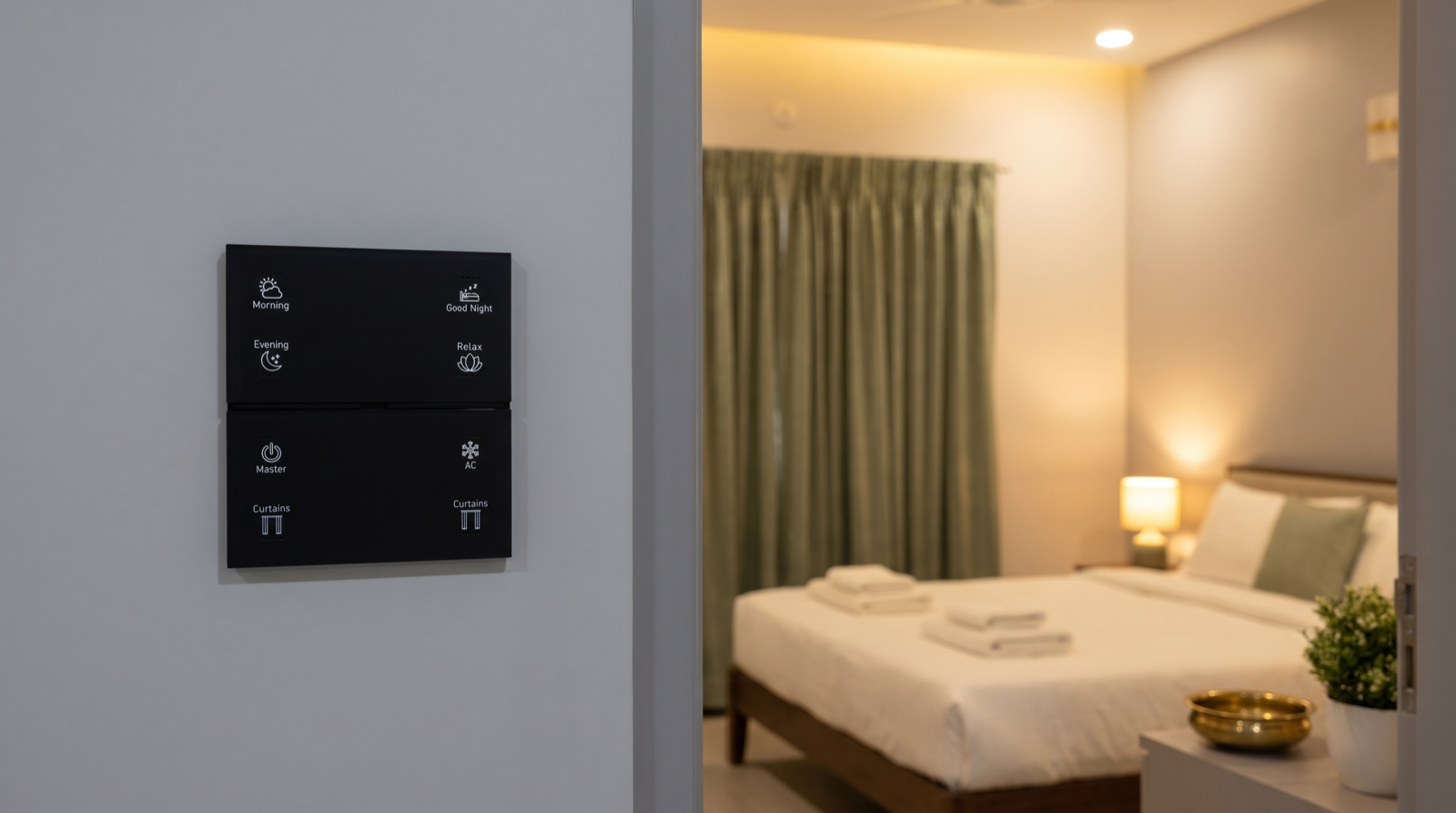
Engraved, backlit labels such as Morning, Evening, Good Night, Relax, Master, AC and Curtains mean a new person can guess correctly without being told. Avoid names that only the owner understands. If a name needs explaining, it is the wrong name; our guide to planning keypad layouts and engraving goes through how to choose them.
2. The same button is in the same position in every room
If Good Night is top-right in the master bedroom, it should be top-right beside every bed in the house, including the guest room. If Curtains is bottom-left in the living room, it is bottom-left in every room that has curtains. People soon stop reading labels and press by position, so consistency prevents mistakes.
| Keypad location | Buttons (same positions throughout) | Why |
|---|---|---|
| Main door | Morning, Evening, Good Night, Master | The arrive and leave buttons; Master only lives here so it cannot be pressed by accident in a bedroom |
| Living room | Morning, Evening, Relax, Good Night, AC, Curtains | The everyday scenes for the shared space |
| Bedside (all bedrooms) | Good Night, Relax, AC, Curtains, room light | Good Night in the same corner beside every bed |
| Grandparent’s bedside | Room light, Good Night, Curtains | Fewer buttons, same positions as the other bedsides |
| Guest room | Room light, Good Night, AC, Curtains | Only this room’s controls; nothing that affects the rest of the house |
3. Fewer buttons where fewer people know the system
The main living spaces can carry six or seven buttons because the family uses them daily. A guest room or a grandparent’s room should carry three or four. Ask of each button: will the person standing here understand it?
Elderly parents, domestic staff and guests
Teaching elderly parents
Parents in their seventies and eighties are often the people who benefit most from automation, and the people most easily put off by it. What works:
- Fewer buttons. Room light, Good Night and Curtains are usually enough beside the bed. Everything else can be handled by the family or by automation.
- Large, clear labels. Engraved, backlit words in simple English (or the words the family actually uses) that can be read without glasses in the evening.
- No app needed. Nothing they use daily should depend on a phone.
- Things that happen by themselves. A low, warm passage light on motion at night, a bathroom light that comes on dimly before sunrise, and lights that stay off when power returns after a cut.
- A call-us note. A small printed card near the bedside keypad: “If a light or curtain is not working, call …” with one family number and the installer’s number.
Teach them in short sessions on two or three different days rather than one long tour, and let them press the buttons themselves. Our guide to home automation for elderly parents in Hyderabad covers safety features like fall-risk lighting and door alerts in more detail.
Teaching domestic staff
For a house-help, cook or caretaker, the goal is confidence within limits. Cover three things:
- What they can control. The lights in the kitchen, utility and the rooms they clean, and the curtains in those rooms. Show them on the keypads, not the app.
- Their own lock code. Each staff member gets a personal code, ideally valid only during their working hours, so entries are logged by name and nobody has to share the owner’s code.
- What they must not change. Security arming, Master (unless they are trusted to lock up), scene and schedule settings and other people’s codes. Say it plainly and kindly: “These ones are for the family.”
Staff often worry about being blamed if something goes wrong; telling them that pressing a labelled button can never damage anything helps a lot.
Guests
Guests need the least teaching and the most protection from accidents. Before guests arrive, switch the house to Guest mode if your system has one: the guest-room keypad controls only that room, the morning wake-up and curtain schedules for the guest room are paused, and night path lights stay on for unfamiliar corridors. Give a temporary lock code that expires on the day they leave, if they need to come and go. Show them the guest-room keypad and the bathroom light, mention the passage light, and leave the house guide in the room. Guests should never need the app.
A one-page house guide for the guest room or kitchen
A printed page beats a long explanation, because people can check it at 11pm without asking anyone. Keep one laminated in the guest room and one near the kitchen. One side of A4 is plenty:
| Section | What it says (example) |
|---|---|
| Welcome line | “This house uses wall keypads instead of switches. Every button says what it does.” |
| This room’s keypad | A simple drawing of the keypad with each button labelled: Room light (press to switch on or off, hold to dim), Good Night, AC, Curtains |
| Going to bed | “Press Good Night. Everything in this room switches off and a low light stays on in the passage.” |
| At night | “The passage and bathroom lights come on dimly by themselves when you walk past.” |
| Please don’t press | “Master at the main door switches off the whole house. Please leave it for the family.” |
| The main door | “Enter your code and press the confirm key. The door locks itself when closed.” (Adjust to your lock’s behaviour.) |
| If something doesn’t respond | “Press once and wait a few seconds. Try the keypad by the door. During a power cut some lights may stay off until the inverter or power returns.” |
| Who to call | One family phone number, then the installer’s support number |
For staff, swap the guest lines for their rooms, working hours and who to tell about a fault. Update the page whenever a keypad changes.
The two-week follow-up
Two weeks is long enough for habits to form and short enough that annoyances have not become workarounds. Spend 20 minutes asking each person, and checking the app history:
- Which buttons does each person actually press? If the grandparent never uses Curtains, consider removing it from their keypad. If everyone presses Evening, it has earned its place.
- Which buttons does nobody press? An unused button is usually a confusing button. Rename it, move it or drop it.
- Did anything surprise anyone? A light switching off too soon, a curtain opening too early, a path light too bright at 3am. These are timing adjustments, not faults.
- Are the staff and guest codes still right? Remove codes for people who no longer need them and check working-hour windows.
| What you notice | Typical adjustment |
|---|---|
| The grandparent switches the room light on and off every night instead of using Good Night | Make the bedside room-light button the first button, and set Good Night to leave a low light on in their room |
| The house-help keeps asking which button lights the utility area | Re-engrave the keypad with the room name, or add a dedicated button |
| A guest pressed Master by mistake | Confirm Master exists only at the main door; add the “please don’t press” line to the house guide |
| The owners still use the app for everyday lights | The keypads are missing a scene they need; add it rather than relying on the phone |
Most homes need two or three small changes after this check, and then the system settles. When you compare installers, ask whether they include a review like this after handover; the answer says a lot about how they think about the people in a home. Our guide to the best home automation companies in Hyderabad lists other questions worth asking.
How Pert delivers it — a designed solution, not a DIY kit
Pert designs and installs complete systems — Stella keypads, tunable and dimmable lighting, motorised curtains, scene automation and security devices — working together on one Zigbee network through the Pert gateway, with scenes and schedules running locally in the home. Onboarding starts before installation, not after it. During design we ask who lives in and visits the house: grandparents, children, staff, drivers and regular guests. From that we decide how many buttons each keypad needs, which buttons go where, what each one is called and which rooms get a simpler layout. We engrave the keypads to match, set up separate lock codes for family and staff, and program a Guest mode if you need one. At handover we walk the family through the system, and we help with the follow-up adjustments once the household has had time to live with it.
Want a smart home that everyone in your family can use from day one? We design and install lighting, curtains, keypads, scenes and security for apartments and villas across Hyderabad, planned around the people who actually live in and visit your home. Request a consultation →
Frequently asked questions
Does everyone in the house need the smart home app?
No. Only the owners need the app, for schedules, alerts and remote access. Children, grandparents, domestic staff and guests should be able to do everything they need from the labelled wall keypads and their own door-lock code. If someone has to open an app to switch on a light, the design has failed them.
How long does it take to teach a new person to use a smart home?
About five minutes for the essentials: how to get in at the main door, what Good Night and Master do, what to do if a light does not respond and where the manual fallback is. Everything else can be learned by using the house. If the walkthrough takes much longer, the system usually has too many buttons or unclear labels.
How do I make a smart home easy for elderly parents?
Give them fewer buttons, not more features: a bedside keypad with large, clear, engraved labels, the same button in the same position as everywhere else in the house, no app to learn, low night path lights that come on by themselves, and a printed note with the number to call. Then check after two weeks what they actually press.
What should domestic staff be allowed to control in a smart home?
Only what the job needs: the lights and curtains in the rooms they work in, the keypad buttons for those rooms and their own door-lock code valid during working hours. They should not change schedules, scenes, security settings or other people’s codes, and they should not need the owner’s app.